
New
Apr 9, 2021 11:57 PM
#51

PiMaHa said: It is possible, but requires changing every part of the theme which relies on height calculations, which is a decent bit of it. Here's some code for that, add to the bottom of your CSS. There are variable at the top, the list-top-spacing and list-height, which are mostly self explanatory and control the rest of the code. You can use "px", "%", or "vh" values for the list-height variable, but cannot use "%" for the list-top-spacing.2. Instead of using absolute pixel values for the height of the list, is it possible to use some type of relative values, so that the list takes up the same part/percentage of the screen no matter the screen size or resolution? :root {
--list-top-spacing: 4vh;
--list-height: 96% - 66px;
}
body::before,
body::after {
top: calc( var(--list-top-spacing) );
height: calc( var(--list-height) );
}
.header {
height: calc( var(--list-top-spacing) );
}
.header .header-title {
top: calc( var(--list-top-spacing) );
}
.header .header-menu.other {
top: calc( var(--list-top-spacing) + 50px );
}
.status-menu-container, .status-menu-container.fixed {
top: var(--list-top-spacing);
}
.list-unit {
padding-bottom: calc( 100vh - ( var(--list-height) + var(--list-top-spacing) ) );
}
footer {
top: calc( var(--list-height) + var(--list-top-spacing) );
height: calc( 100% - ( var(--list-height) + var(--list-top-spacing) ) );
}PiMaHa said: 1. At the bottom of my list, there's some whitespace. Is it possible to get rid of that? https://i.imgur.com/7fldM6j.png That padding is interlinked with the height, so the extra space is due to your taller list. There is a solution to this included in problem #2 so no need to use this if you are using that code already, but a standalone solution would be to change the padding on the list-unit. Example: .list-unit {
padding-bottom: calc(100vh - 868px);
} |
Apr 12, 2021 9:45 AM
#52

| @Valerio_Lyndon Thank you so much for writing all that extra code for me! I'm very happy with it. <3 |
 |
Apr 13, 2021 9:01 AM
#53

| Hello, thank you for providing this template! I have used it and modified it to my liking. I didn't adjust anything to do with the "LIST STYLE" menu button on the side but the text is slightly out of place. Image below 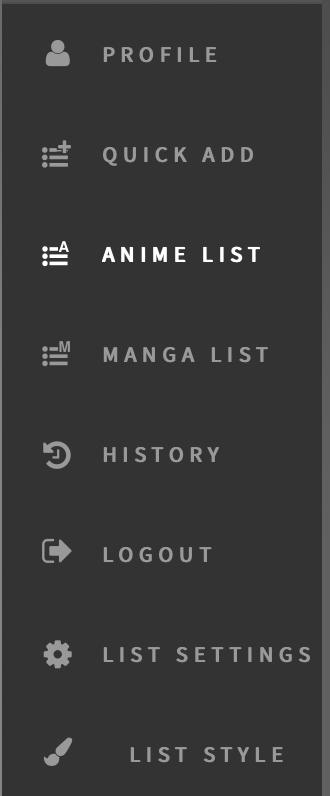 |
#FreePalestine 🇵🇸 |
May 3, 2021 5:18 AM
#54

Hello, I did a little remake of the list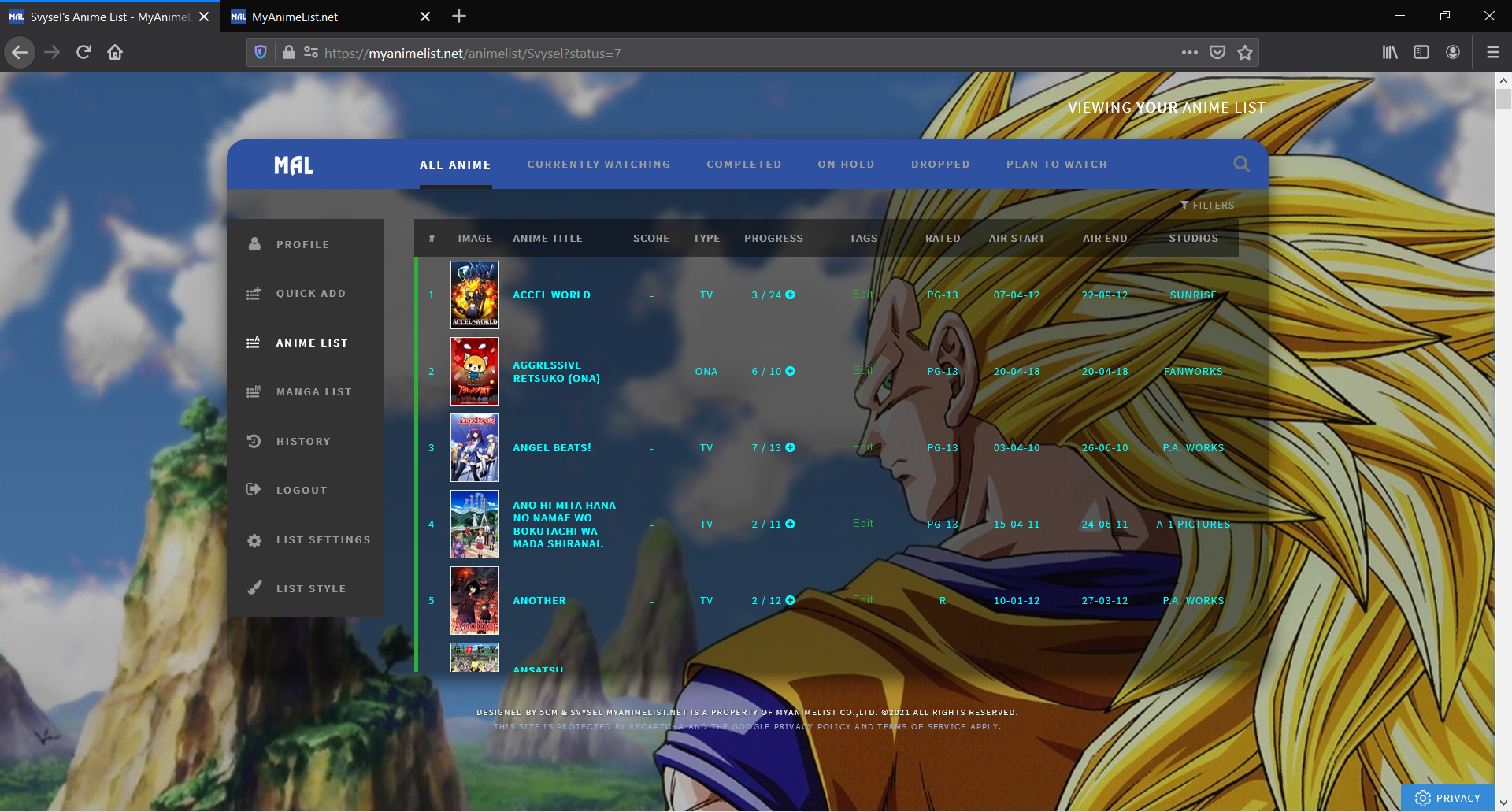 Here is css code: @\import "https://fonts.googleapis.com/css?family=Source+Sans+Pro"; :root { --background: fixed center/cover url(https://i.postimg.cc/JzHSb7Kg/opacity.png), fixed center/cover url(https://images5.alphacoders.com/474/thumb-1920-474474.jpg); } Thanks for theme. body { background: var(--background) !important; width: 1058px; font: 11px Source Sans Pro; letter-spacing: 1px; text-transform: uppercase; padding: 70px 0 0; margin: auto; color: cyan; } body::before, body::after { content: ""; position: fixed; top: 68px; left: calc(50% - 529px); width: 1058px; height: 541px; border-radius: 20px; pointer-events: none; } body::before { z-index: 60; background: rgba(5,5,5,.5); } body::after { z-index: 110; box-shadow: 0 8px 20px rgba(0,0,0,.6); } a {color: cyan;} #header-menu-button .fa, [data-owner=""] .list-menu-float, .cover-block, .list-menu-float .icon-menu.export, .list-menu-float .icon-menu.setting svg.icon-setting, .list-unit .list-status-title .text, #show-stats-button, .list-unit:not(.all_anime) .status, .icon-watch.ml4,[data-owner=""] .add-edit-more span, .more, .list-unit:not(.watching) .icon-add-episode {display: none;} .header { position: fixed; top: 0; height: 68px; z-index: 100; background: var(--background); } .header .header-title {background: #2e51a2 43px 2px/50px no-repeat url(https://image.myanimelist.net/ui/fkLITaJTefafxFKPGRzngvQqHPDcc6jatqmY_RHEj9-Z8-4goIa5WgKMI8CQvYLg); width: 160px; height: 50px; top: 68px; z-index: 2; border-radius: 20px 0 0; border-bottom: 1px solid #555;} .header .header-title:hover {background-color: #222;} .header .header-menu.other {width: 160px; top: 118px; left: 0; z-index:2;} [data-owner=""] .header .header-menu .btn-menu, .header .header-menu .header-info {font-size: 0; text-align: left; margin: 0;} .header .header-menu .header-info {margin-top: 50px;} #header-menu-button, .anime .list-menu-float .icon-menu.anime-list, .anime .list-menu-float .icon-menu.anime-list svg, .anime .list-menu-float .icon-menu.anime-list .text, .anime .list-menu-float .icon-menu.anime-list:hover, .manga .list-menu-float .icon-menu.manga-list, .manga .list-menu-float .icon-menu.manga-list svg, .manga .list-menu-float .icon-menu.manga-list .text, .manga .list-menu-float .icon-menu.manga-list:hover { background-color: transparent; color: #333 !important; fill: #333;} #header-menu-button:before {content: ''; display: inline-block; width: 13px; height: 12px; margin: 0 10px 0 20px;} .anime #header-menu-button:before {background: left/cover url(https://image.myanimelist.net/ui/psYiTUtmhCM147Lw1c2IfEdpMGgqTXOAV7TUBQQzrxk9HddL_-Sx7EGuKbYvYuAf);} .manga #header-menu-button:before {background: left/cover url(https://image.myanimelist.net/ui/psYiTUtmhCM147Lw1c2IfEH4MpovaYtG8IwnuF48Imc3YkKXdBZRhkHFhaL-Jc1D);} .header a, .header .header-menu .list-menu .icon-menu {display: block; width: 160px; height: 50px; transition: none;} .header .header-menu .list-menu {top: 100px; left: 0; background: none; display: block!important; border: 0; box-shadow: none;} .header .header-menu .list-menu .icon-menu .text {left: 48px; top: 0; font-size: 11px; color: #999;} .header-info [href*=shared]:before {font: 14px FontAwesome; content: '\f0ec'; padding: 0 11px 0 20px;} .fa.fa-history {padding: 0 6px 0 21px; font-size: 16px;} .header-info [href*=login] {border-top: 1px solid #555;} .header-info [href*=login]:before {font: 17px FontAwesome; content: '\f090'; padding: 0 12px 0 20px;} .header-info [href*=register]:before {font: 14px FontAwesome; content: '\f234';padding: 0 12px 0 20px;} .header-info [href*=register]:after {content: 'Register'; font-size: 11px; letter-spacing: 2px;} .header a, .header a.username:after, .list-menu-float .icon-menu.profile:after { content: 'Profile'; font: bold 11px Source Sans Pro; color: #999!important; line-height: 50px; letter-spacing: 2px;} .header a:not(.header-title):hover, .header a:not(.header-title):hover::before, .header a:not(.header-title):hover::after, .header .header-menu .list-menu .icon-menu:hover, .list-menu-float .icon-menu.profile:hover { background: #222; color: white !important; text-decoration: none;} .header a.username, .header-info [href*=register], .list-menu-float .icon-menu.setting .text .link-style-setting { font-size: 0; letter-spacing: 0;} .header a.username:before {content: '\f007'; font: 15px FontAwesome; padding: 0 15px 0 20px;} .header a.username:hover:after, .header .header-menu .list-menu .icon-menu:hover svg.icon, .header .header-menu .list-menu .icon-menu:hover .text, .list-menu-float .icon-menu.setting .text .link-style-setting:hover:before { fill: white; color: white;} .header .header-menu .list-menu .icon-menu svg.icon, .list-menu-float .icon-menu svg.icon { width: 15px; fill: #999; top: 15px!important; left: 20px!important;} .list-menu-float { position: fixed; top: 149px; left: calc(50% - 529px); width: 160px; border: 0; z-index: 80; } .list-menu-float .icon-menu {background: #333; width: 100%; transition: none;} .list-menu-float .icon-menu.profile {background-image: none!important; width: 110px; padding-left: 50px; text-align: left;} .list-menu-float .icon-menu.profile:before {content: '\f007'; font: 15px FontAwesome; color: #999; position: absolute; top: 17px; left: 22px;} .list-menu-float .icon-menu .text {font: bold 11px Source Sans Pro; color: #999; letter-spacing: 2px; width: auto; top: 18px; opacity: 1; transition: none;} .list-menu-float .icon-menu.setting .text {left: 0; width: 100%; height: auto; text-align: left; opacity: 1;} .list-menu-float .icon-menu.setting .text .link-list-setting, .list-menu-float .icon-menu.setting .text .link-style-setting, .list-menu-float .icon-menu.setting:hover .text, .list-menu-float .icon-menu.setting:hover .text .link-list-setting, .list-menu-float .icon-menu.setting:hover .text .link-style-setting { background: #333; width: 100%; color: #999; line-height: 50px; border: 0; opacity: 1;} .list-menu-float .icon-menu:not(.profile):hover, .list-menu-float .icon-menu.setting .text .link-list-setting:hover, .list-menu-float .icon-menu.setting .text .link-style-setting:hover { background: #222; width: 100%; color: white;} .list-menu-float .icon-menu.profile:hover { background: #222; color: white; } .list-menu-float .icon-menu.profile:hover::before, .list-menu-float .icon-menu.profile:hover::after { color: white !important; } .list-menu-float .icon-menu.profile:hover:before, .list-menu-float .icon-menu.setting .text .link-list-setting:hover:before, .list-menu-float .icon-menu.profile:hover:after, .list-menu-float .icon-menu:hover .text {width: auto; color: white;} .list-menu-float .icon-menu.setting .text .link-list-setting {padding-left: 50px;} .list-menu-float .icon-menu.setting .text .link-style-setting:after { content:'List style'; font-size: 11px; letter-spacing: 2px; padding-left: 50px;} .list-menu-float .icon-menu.setting .text .link-list-setting:before { content: '\f013'; font: 16px FontAwesome; color: #999; position: absolute; margin:17px 0 0 -29px;} .list-menu-float .icon-menu.setting .text .link-style-setting:before { content: '\f1fc'; font: 14px FontAwesome; color: #999; position: absolute; margin: 17px 21px;} .list-container { margin-top: -2px; z-index: 70; padding-top: 51px; background: none; border: 0;} [data-owner=""] .list-container {margin-top: -2px;} .list-block, .status-menu-container.fixed + div.list-block {margin: 0; min-height: auto;} .list-unit { width: auto; margin-left: 160px; padding: 10px 30px calc(100vh - 609px); background: none; border-radius: 0 0 20px;} .status-menu-container, .status-menu-container.fixed { position: fixed; top: 68px; left: calc(50% - 369px); width: 898px; height: 50px; border-radius: 0 20px 0 0; } .status-menu-container .status-menu { height: 100%; margin-left: 0; border-spacing: 36px 0; } .status-menu-container .status-menu .status-button {font: bold 11px Source Sans Pro; letter-spacing: 2px;} .status-menu-container .status-menu .status-button.on {font-size: 12px; color: black;} .status-menu-container .status-menu .status-button.all_anime:after {background: #222;} .status-menu-container .status-menu .status-button.watching:after {background-color: #2db039;} .status-menu-container .status-menu .status-button.plantowatch:after {background-color: #c3c3c3;} .status-menu-container .status-menu .status-button.completed:after {background-color: #2a328c;} .status-menu-container .status-menu .status-button.onhold:after {background-color: #f1c83e;} .status-menu-container .status-menu .status-button.dropped:after {background-color: #a12f31;} .status-menu-container .search-container #search-box input {font: 11px Source Sans Pro; color: #999; letter-spacing: 1px; padding: 0 8px; border-radius: 20px; border: 1px solid #ccc;} .list-unit .list-status-title {width: 100%; height: 20px; background:none;} .list-unit .list-status-title .stats {height: auto; line-height: 0;} .list-unit .list-status-title .stats a {color: #999; margin: 0;} .list-table .list-table-header .header-title, .list-table .list-table-header .header-title .link.sort, .list-table .list-table-header .header-title .link.sort:hover {color: grey;} .list-table .list-table-data .data.title, .list-table .list-table-data .data.studio {height: 40px; line-height: 1.2em;} .list-table .list-table-data .data.title .link {font-size: 11px;} .list-table .list-table-data .data.title .add-edit-more {float: none; display: inline-block; height: 0; font-size: 0; white-space: nowrap; margin-left: 5px; opacity: 0;} .list-table .list-table-data .data.title:hover .add-edit-more {opacity: 1;} .list-table .list-table-data .data.title .content-status {font-size: 9px; font-style: italic;} .list-table .list-table-data a:not(.edit-disabled):hover {text-decoration: none; background: #444; color: white;} .list-unit .loading-space {margin: 5px;} footer { position: fixed; top: 609px; left: 0; z-index: 100; width: 100%; height: calc(100% - 609px); background: var(--background); } #footer-block {background: none; padding: 20px;} #copyright {font: 9px Source Sans Pro; color: white; text-shadow: 1px 1px 2px #333; padding-top: 15px;} #copyright:before {content: 'Designed by 5cm & Svysel';} .data.tags span, .data.tags span a, .list-table .list-table-data .data.tags, .list-table .list-table-data .data.tags a{ text-transform: none !important; } #header-menu-button, .anime .list-menu-float .icon-menu.anime-list, .anime .list-menu-float .icon-menu.anime-list svg, .anime .list-menu-float .icon-menu.anime-list .text, .anime .list-menu-float .icon-menu.anime-list:hover, .manga .list-menu-float .icon-menu.manga-list, .manga .list-menu-float .icon-menu.manga-list svg, .manga .list-menu-float .icon-menu.manga-list .text, .manga .list-menu-float .icon-menu.manga-list:hover { background-color: transparent;} .status-menu-container { background-color: #2e51a2;} .status-menu-container { border-bottom: 0;} .list-table { border: 0; } .list-table > tbody:nth-of-type(2n+1) { background-color: transparent; } .list-table .list-table-data .data { border-bottom: 0; } .list-table .list-table-header .header-title { background: rgba(5,5,5,.5); } .list-table .list-table-header .header-title, .list-table .list-table-header .header-title .link.sort, .list-table .list-table-header .header-title .link.sort:hover { color: #9B9B9B; } .list-table .list-table-header .header-title .link { color: #9B9B9B; } .list-table .list-table-header .header-title:hover, .list-table .list-table-header .header-title .link.sort:hover, .list-table .list-table-header .header-title .link.sort:hover { color: white; } .list-table .list-table-header .header-title .link:hover { color: white; } .status-menu-container .status-menu .status-button.on { color: black; } .list-table .list-table-data a.edit-disabled { color: white; } .list-table .list-table-header .header-title { border-bottom: 0;} #header-menu-button, .anime .list-menu-float .icon-menu.anime-list, .anime .list-menu-float .icon-menu.anime-list svg, .anime .list-menu-float .icon-menu.anime-list .text, .anime .list-menu-float .icon-menu.anime-list:hover, .manga .list-menu-float .icon-menu.manga-list, .manga .list-menu-float .icon-menu.manga-list svg, .manga .list-menu-float .icon-menu.manga-list .text, .manga .list-menu-float .icon-menu.manga-list:hover { background-color: #333; color: white !important; fill: white; } .status-menu-container .status-menu .status-button.on { color: white; } .status-menu-container .status-menu .status-button:hover{ color: white; } .header a, .header .header-menu .list-menu .icon-menu{ background: #333; } |
Jun 2, 2021 2:56 PM
#55
| the list cuts out at 300 entries and doesnt load any more entries. is this just me? |
Jun 2, 2021 6:10 PM
#56

salmarad said: the list cuts out at 300 entries and doesnt load any more entries. is this just me? Use the fixed versions from the opening post |
 |
Jun 2, 2021 6:11 PM
#57
Svysel said: Hello, I did a little remake of the list Here is css code: @\import "https://fonts.googleapis.com/css?family=Source+Sans+Pro"; :root { --background: fixed center/cover url(https://i.postimg.cc/JzHSb7Kg/opacity.png), fixed center/cover url(https://images5.alphacoders.com/474/thumb-1920-474474.jpg); } Thanks for theme. body { background: var(--background) !important; width: 1058px; font: 11px Source Sans Pro; letter-spacing: 1px; text-transform: uppercase; padding: 70px 0 0; margin: auto; color: cyan; } body::before, body::after { content: ""; position: fixed; top: 68px; left: calc(50% - 529px); width: 1058px; height: 541px; border-radius: 20px; pointer-events: none; } body::before { z-index: 60; background: rgba(5,5,5,.5); } body::after { z-index: 110; box-shadow: 0 8px 20px rgba(0,0,0,.6); } a {color: cyan;} #header-menu-button .fa, [data-owner=""] .list-menu-float, .cover-block, .list-menu-float .icon-menu.export, .list-menu-float .icon-menu.setting svg.icon-setting, .list-unit .list-status-title .text, #show-stats-button, .list-unit:not(.all_anime) .status, .icon-watch.ml4,[data-owner=""] .add-edit-more span, .more, .list-unit:not(.watching) .icon-add-episode {display: none;} .header { position: fixed; top: 0; height: 68px; z-index: 100; background: var(--background); } .header .header-title {background: #2e51a2 43px 2px/50px no-repeat url(https://image.myanimelist.net/ui/fkLITaJTefafxFKPGRzngvQqHPDcc6jatqmY_RHEj9-Z8-4goIa5WgKMI8CQvYLg); width: 160px; height: 50px; top: 68px; z-index: 2; border-radius: 20px 0 0; border-bottom: 1px solid #555;} .header .header-title:hover {background-color: #222;} .header .header-menu.other {width: 160px; top: 118px; left: 0; z-index:2;} [data-owner=""] .header .header-menu .btn-menu, .header .header-menu .header-info {font-size: 0; text-align: left; margin: 0;} .header .header-menu .header-info {margin-top: 50px;} #header-menu-button, .anime .list-menu-float .icon-menu.anime-list, .anime .list-menu-float .icon-menu.anime-list svg, .anime .list-menu-float .icon-menu.anime-list .text, .anime .list-menu-float .icon-menu.anime-list:hover, .manga .list-menu-float .icon-menu.manga-list, .manga .list-menu-float .icon-menu.manga-list svg, .manga .list-menu-float .icon-menu.manga-list .text, .manga .list-menu-float .icon-menu.manga-list:hover { background-color: transparent; color: #333 !important; fill: #333;} #header-menu-button:before {content: ''; display: inline-block; width: 13px; height: 12px; margin: 0 10px 0 20px;} .anime #header-menu-button:before {background: left/cover url(https://image.myanimelist.net/ui/psYiTUtmhCM147Lw1c2IfEdpMGgqTXOAV7TUBQQzrxk9HddL_-Sx7EGuKbYvYuAf);} .manga #header-menu-button:before {background: left/cover url(https://image.myanimelist.net/ui/psYiTUtmhCM147Lw1c2IfEH4MpovaYtG8IwnuF48Imc3YkKXdBZRhkHFhaL-Jc1D);} .header a, .header .header-menu .list-menu .icon-menu {display: block; width: 160px; height: 50px; transition: none;} .header .header-menu .list-menu {top: 100px; left: 0; background: none; display: block!important; border: 0; box-shadow: none;} .header .header-menu .list-menu .icon-menu .text {left: 48px; top: 0; font-size: 11px; color: #999;} .header-info [href*=shared]:before {font: 14px FontAwesome; content: '\f0ec'; padding: 0 11px 0 20px;} .fa.fa-history {padding: 0 6px 0 21px; font-size: 16px;} .header-info [href*=login] {border-top: 1px solid #555;} .header-info [href*=login]:before {font: 17px FontAwesome; content: '\f090'; padding: 0 12px 0 20px;} .header-info [href*=register]:before {font: 14px FontAwesome; content: '\f234';padding: 0 12px 0 20px;} .header-info [href*=register]:after {content: 'Register'; font-size: 11px; letter-spacing: 2px;} .header a, .header a.username:after, .list-menu-float .icon-menu.profile:after { content: 'Profile'; font: bold 11px Source Sans Pro; color: #999!important; line-height: 50px; letter-spacing: 2px;} .header a:not(.header-title):hover, .header a:not(.header-title):hover::before, .header a:not(.header-title):hover::after, .header .header-menu .list-menu .icon-menu:hover, .list-menu-float .icon-menu.profile:hover { background: #222; color: white !important; text-decoration: none;} .header a.username, .header-info [href*=register], .list-menu-float .icon-menu.setting .text .link-style-setting { font-size: 0; letter-spacing: 0;} .header a.username:before {content: '\f007'; font: 15px FontAwesome; padding: 0 15px 0 20px;} .header a.username:hover:after, .header .header-menu .list-menu .icon-menu:hover svg.icon, .header .header-menu .list-menu .icon-menu:hover .text, .list-menu-float .icon-menu.setting .text .link-style-setting:hover:before { fill: white; color: white;} .header .header-menu .list-menu .icon-menu svg.icon, .list-menu-float .icon-menu svg.icon { width: 15px; fill: #999; top: 15px!important; left: 20px!important;} .list-menu-float { position: fixed; top: 149px; left: calc(50% - 529px); width: 160px; border: 0; z-index: 80; } .list-menu-float .icon-menu {background: #333; width: 100%; transition: none;} .list-menu-float .icon-menu.profile {background-image: none!important; width: 110px; padding-left: 50px; text-align: left;} .list-menu-float .icon-menu.profile:before {content: '\f007'; font: 15px FontAwesome; color: #999; position: absolute; top: 17px; left: 22px;} .list-menu-float .icon-menu .text {font: bold 11px Source Sans Pro; color: #999; letter-spacing: 2px; width: auto; top: 18px; opacity: 1; transition: none;} .list-menu-float .icon-menu.setting .text {left: 0; width: 100%; height: auto; text-align: left; opacity: 1;} .list-menu-float .icon-menu.setting .text .link-list-setting, .list-menu-float .icon-menu.setting .text .link-style-setting, .list-menu-float .icon-menu.setting:hover .text, .list-menu-float .icon-menu.setting:hover .text .link-list-setting, .list-menu-float .icon-menu.setting:hover .text .link-style-setting { background: #333; width: 100%; color: #999; line-height: 50px; border: 0; opacity: 1;} .list-menu-float .icon-menu:not(.profile):hover, .list-menu-float .icon-menu.setting .text .link-list-setting:hover, .list-menu-float .icon-menu.setting .text .link-style-setting:hover { background: #222; width: 100%; color: white;} .list-menu-float .icon-menu.profile:hover { background: #222; color: white; } .list-menu-float .icon-menu.profile:hover::before, .list-menu-float .icon-menu.profile:hover::after { color: white !important; } .list-menu-float .icon-menu.profile:hover:before, .list-menu-float .icon-menu.setting .text .link-list-setting:hover:before, .list-menu-float .icon-menu.profile:hover:after, .list-menu-float .icon-menu:hover .text {width: auto; color: white;} .list-menu-float .icon-menu.setting .text .link-list-setting {padding-left: 50px;} .list-menu-float .icon-menu.setting .text .link-style-setting:after { content:'List style'; font-size: 11px; letter-spacing: 2px; padding-left: 50px;} .list-menu-float .icon-menu.setting .text .link-list-setting:before { content: '\f013'; font: 16px FontAwesome; color: #999; position: absolute; margin:17px 0 0 -29px;} .list-menu-float .icon-menu.setting .text .link-style-setting:before { content: '\f1fc'; font: 14px FontAwesome; color: #999; position: absolute; margin: 17px 21px;} .list-container { margin-top: -2px; z-index: 70; padding-top: 51px; background: none; border: 0;} [data-owner=""] .list-container {margin-top: -2px;} .list-block, .status-menu-container.fixed + div.list-block {margin: 0; min-height: auto;} .list-unit { width: auto; margin-left: 160px; padding: 10px 30px calc(100vh - 609px); background: none; border-radius: 0 0 20px;} .status-menu-container, .status-menu-container.fixed { position: fixed; top: 68px; left: calc(50% - 369px); width: 898px; height: 50px; border-radius: 0 20px 0 0; } .status-menu-container .status-menu { height: 100%; margin-left: 0; border-spacing: 36px 0; } .status-menu-container .status-menu .status-button {font: bold 11px Source Sans Pro; letter-spacing: 2px;} .status-menu-container .status-menu .status-button.on {font-size: 12px; color: black;} .status-menu-container .status-menu .status-button.all_anime:after {background: #222;} .status-menu-container .status-menu .status-button.watching:after {background-color: #2db039;} .status-menu-container .status-menu .status-button.plantowatch:after {background-color: #c3c3c3;} .status-menu-container .status-menu .status-button.completed:after {background-color: #2a328c;} .status-menu-container .status-menu .status-button.onhold:after {background-color: #f1c83e;} .status-menu-container .status-menu .status-button.dropped:after {background-color: #a12f31;} .status-menu-container .search-container #search-box input {font: 11px Source Sans Pro; color: #999; letter-spacing: 1px; padding: 0 8px; border-radius: 20px; border: 1px solid #ccc;} .list-unit .list-status-title {width: 100%; height: 20px; background:none;} .list-unit .list-status-title .stats {height: auto; line-height: 0;} .list-unit .list-status-title .stats a {color: #999; margin: 0;} .list-table .list-table-header .header-title, .list-table .list-table-header .header-title .link.sort, .list-table .list-table-header .header-title .link.sort:hover {color: grey;} .list-table .list-table-data .data.title, .list-table .list-table-data .data.studio {height: 40px; line-height: 1.2em;} .list-table .list-table-data .data.title .link {font-size: 11px;} .list-table .list-table-data .data.title .add-edit-more {float: none; display: inline-block; height: 0; font-size: 0; white-space: nowrap; margin-left: 5px; opacity: 0;} .list-table .list-table-data .data.title:hover .add-edit-more {opacity: 1;} .list-table .list-table-data .data.title .content-status {font-size: 9px; font-style: italic;} .list-table .list-table-data a:not(.edit-disabled):hover {text-decoration: none; background: #444; color: white;} .list-unit .loading-space {margin: 5px;} footer { position: fixed; top: 609px; left: 0; z-index: 100; width: 100%; height: calc(100% - 609px); background: var(--background); } #footer-block {background: none; padding: 20px;} #copyright {font: 9px Source Sans Pro; color: white; text-shadow: 1px 1px 2px #333; padding-top: 15px;} #copyright:before {content: 'Designed by 5cm & Svysel';} .data.tags span, .data.tags span a, .list-table .list-table-data .data.tags, .list-table .list-table-data .data.tags a{ text-transform: none !important; } #header-menu-button, .anime .list-menu-float .icon-menu.anime-list, .anime .list-menu-float .icon-menu.anime-list svg, .anime .list-menu-float .icon-menu.anime-list .text, .anime .list-menu-float .icon-menu.anime-list:hover, .manga .list-menu-float .icon-menu.manga-list, .manga .list-menu-float .icon-menu.manga-list svg, .manga .list-menu-float .icon-menu.manga-list .text, .manga .list-menu-float .icon-menu.manga-list:hover { background-color: transparent;} .status-menu-container { background-color: #2e51a2;} .status-menu-container { border-bottom: 0;} .list-table { border: 0; } .list-table > tbody:nth-of-type(2n+1) { background-color: transparent; } .list-table .list-table-data .data { border-bottom: 0; } .list-table .list-table-header .header-title { background: rgba(5,5,5,.5); } .list-table .list-table-header .header-title, .list-table .list-table-header .header-title .link.sort, .list-table .list-table-header .header-title .link.sort:hover { color: #9B9B9B; } .list-table .list-table-header .header-title .link { color: #9B9B9B; } .list-table .list-table-header .header-title:hover, .list-table .list-table-header .header-title .link.sort:hover, .list-table .list-table-header .header-title .link.sort:hover { color: white; } .list-table .list-table-header .header-title .link:hover { color: white; } .status-menu-container .status-menu .status-button.on { color: black; } .list-table .list-table-data a.edit-disabled { color: white; } .list-table .list-table-header .header-title { border-bottom: 0;} #header-menu-button, .anime .list-menu-float .icon-menu.anime-list, .anime .list-menu-float .icon-menu.anime-list svg, .anime .list-menu-float .icon-menu.anime-list .text, .anime .list-menu-float .icon-menu.anime-list:hover, .manga .list-menu-float .icon-menu.manga-list, .manga .list-menu-float .icon-menu.manga-list svg, .manga .list-menu-float .icon-menu.manga-list .text, .manga .list-menu-float .icon-menu.manga-list:hover { background-color: #333; color: white !important; fill: white; } .status-menu-container .status-menu .status-button.on { color: white; } .status-menu-container .status-menu .status-button:hover{ color: white; } .header a, .header .header-menu .list-menu .icon-menu{ background: #333; } Looks cool! Thanks! :D |
|
Jun 2, 2021 6:13 PM
#58
AyyMayy said: Hello, thank you for providing this template! I have used it and modified it to my liking. I didn't adjust anything to do with the "LIST STYLE" menu button on the side but the text is slightly out of place. Image below If this is still a problem, see my Inspect Element video and adjust it with that tool |
|
Jun 3, 2021 2:37 AM
#59
Shishio-kun said: If this is still a problem, see my Inspect Element video and adjust it with that tool Sorry, I forgot to say that I fixed it in this forum! - Thanks! |
#FreePalestine 🇵🇸 |
Jun 3, 2021 4:54 AM
#60
Shishio-kun said: salmarad said: the list cuts out at 300 entries and doesnt load any more entries. is this just me? Use the fixed versions from the opening post Thanks! |
Jun 15, 2021 7:47 AM
#61

I was wondering if there would be any possible way to combine the "STARTED DATE", "FINISHED DATE" and potentially "DAYS".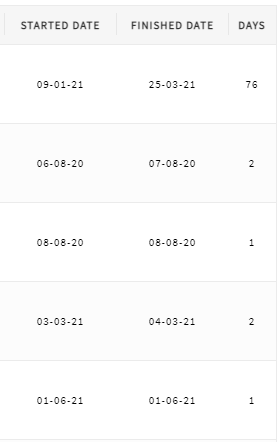 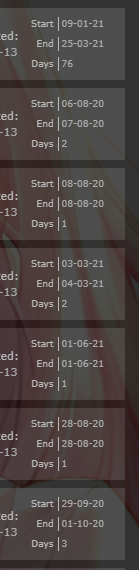 Would be increadible if you could still easily sort by all 3 categories, but idk if thats posible, might be too much to ask. 😅 Clarity does both these two things perfectly. |
DimitrovNJun 15, 2021 8:01 AM

Jun 15, 2021 9:56 AM
#62
DimitrovN said: I was wondering if there would be any possible way to combine the "STARTED DATE", "FINISHED DATE" and potentially "DAYS". Would be increadible if you could still easily sort by all 3 categories, but idk if thats posible, might be too much to ask. 😅 Clarity does both these two things perfectly. You could move the text yourself with Inspect Element https://myanimelist.net/forum/?topicid=1780591 If you do, you can give us the code changes and I would add them to the OP If you need more specific codes to control the text you could get them from here under Table Codes, but with Inspect Element this might not be necessary. https://myanimelist.net/forum/?topicid=1929120 |
|
Jun 15, 2021 10:58 AM
#63
DimitrovN said: I was wondering if there would be any possible way to combine the "STARTED DATE", "FINISHED DATE" and potentially "DAYS". Would be increadible if you could still easily sort by all 3 categories, but idk if thats posible, might be too much to ask. 😅 Clarity does both these two things perfectly. Looks like you were making some good progress, but I already wrote this so I'll just share it. It is made to be applied on top of the default theme, so the new code you added will interfere. You can try this on a new MyAnimeList style if you want to keep your current code and compare. 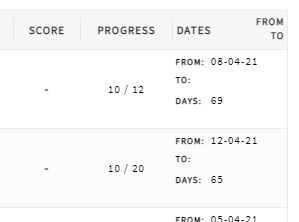 /* Repositioned Dates */
.header-title.started,
.header-title.finished {
position: absolute;
width: 0 !important;
padding: 0;
}
.header-title.started a,
.header-title.finished a {
width: 72px;
text-align: right;
font-size: 0 !important;
letter-spacing: 0px;
margin-left: 40px;
}
.header-title.started a {
margin-top: 4px;
}
.header-title.finished a {
margin-top: 18px;
}
.header-title.started a::before {
content: "From";
font-size: 10px;
letter-spacing: 1px;
}
.header-title.finished a::before {
content: "To";
font-size: 10px;
letter-spacing: 1px;
}
.header-title.started i,
.header-title.finished i {
margin-left: 3px;
font-size: 10px;
letter-spacing: 1px;
}
.list-table .list-table-header .header-title.days {
width: 112px;
font-size: 0;
letter-spacing: 0px;
text-align: left;
}
.header-title.days::after {
content: " Dates";
font-size: 11px;
letter-spacing: 1px;
}
.list-table .list-table-data .data.started,
.list-table .list-table-data .data.finished,
.list-table .list-table-data .data.days {
padding: 2px 0;
text-align: left;
}
.list-table .list-table-data .data.started,
.list-table .list-table-data .data.finished {
position: absolute;
border: none;
}
.list-table .list-table-data .data.started {
margin-top: 2px;
}
.list-table .list-table-data .data.finished {
margin-top: 21px;
}
.list-table .list-table-data .data.days {
padding-top: 42px;
vertical-align: top;
}
.data.started::before,
.data.finished::before,
.data.days::before {
display: inline-block;
width: 32px;
padding-left: 3px;
}
.data.started::before {
content: "From:";
font-size: 9px;
font-weight: bold;
}
.data.finished::before {
content: "To:";
font-size: 9px;
font-weight: bold;
}
.data.days::before {
content: "Days:";
font-size: 9px;
font-weight: bold;
}Due to how the HTML works, it won't initially work with the airing dates or season because MAL decided to re-use selectors. I believe adding this extra code should fix that, but I haven't extensively tested this part. It basically resets all the code that is affecting the airing dates. /* Support for season and airing dates */
.header-title.started ~ .started,
.header-title.finished ~ .finished {
position: static;
width: initial !important;
padding: 1px;
}
.header-title.started ~ .started a,
.header-title.finished ~ .finished a {
position: static;
width: initial !important;
font-size: 11px !important;
letter-spacing: 1px;
margin: 0;
}
.header-title.started ~ .started a::before,
.header-title.finished ~ .finished a::before {
content: none;
}
.header-title.started ~ .started i,
.header-title.finished ~ .finished i {
margin-left: 0;
}https://i.imgur.com/oYdmGpd.png This is just another method of achieving the same thing and I'm leaving it here in case I need it later. /* Repositioned Dates */ .header-title.started, .header-title.days, .header-title.started a, .header-title.days a { width: 0 !important; padding: 0; font-size: 0 !important; } .header-title.finished:nth-last-child(2) { background-image: none; } .header-title.finished a { font-size: 0 !important; letter-spacing: 0px; } .header-title.finished a::after { content: "Dates"; font-size: 11px; letter-spacing: 1px; } .list-table .list-table-data .data.started, .list-table .list-table-data .data.finished, .list-table .list-table-data .data.days { text-align: left; } .list-table .list-table-data .data.started { display: block; margin-right: -112px; border: none; } .list-table .list-table-data .data.finished { padding-top: 25.5px; vertical-align: top; } .list-table .list-table-data .data.days { position: relative; top: 43px; display: block; margin-left: -112px; border: none; } .data.started::before, .data.finished::before, .data.days::before { display: inline-block; width: 32px; padding-left: 3px; } .data.started::before { content: "From:"; font-size: 9px; font-weight: bold; } .data.finished::before { content: "To:"; font-size: 9px; font-weight: bold; } .data.days::before { content: "Days:"; font-size: 9px; font-weight: bold; } |
Jun 15, 2021 11:17 AM
#64
Valerio_Lyndon said: DimitrovN said: I was wondering if there would be any possible way to combine the "STARTED DATE", "FINISHED DATE" and potentially "DAYS". Would be increadible if you could still easily sort by all 3 categories, but idk if thats posible, might be too much to ask. 😅 Clarity does both these two things perfectly. Looks like you were making some good progress, but I already wrote this so I'll just share it. It is made to be applied on top of the default theme, so the new code you added will interfere. You can try this on a new MyAnimeList style if you want to keep your current code and compare. /* Repositioned Dates */
.header-title.started,
.header-title.finished {
position: absolute;
width: 0 !important;
padding: 0;
}
.header-title.started a,
.header-title.finished a {
width: 72px;
text-align: right;
font-size: 0 !important;
letter-spacing: 0px;
margin-left: 40px;
}
.header-title.started a {
margin-top: 4px;
}
.header-title.finished a {
margin-top: 18px;
}
.header-title.started a::before {
content: "From";
font-size: 10px;
letter-spacing: 1px;
}
.header-title.finished a::before {
content: "To";
font-size: 10px;
letter-spacing: 1px;
}
.header-title.started i,
.header-title.finished i {
margin-left: 3px;
font-size: 10px;
letter-spacing: 1px;
}
.list-table .list-table-header .header-title.days {
width: 112px;
font-size: 0;
letter-spacing: 0px;
text-align: left;
}
.header-title.days::after {
content: " Dates";
font-size: 11px;
letter-spacing: 1px;
}
.list-table .list-table-data .data.started,
.list-table .list-table-data .data.finished,
.list-table .list-table-data .data.days {
padding: 2px 0;
text-align: left;
}
.list-table .list-table-data .data.started,
.list-table .list-table-data .data.finished {
position: absolute;
border: none;
}
.list-table .list-table-data .data.started {
margin-top: 2px;
}
.list-table .list-table-data .data.finished {
margin-top: 21px;
}
.list-table .list-table-data .data.days {
padding-top: 42px;
vertical-align: top;
}
.data.started::before,
.data.finished::before,
.data.days::before {
display: inline-block;
width: 32px;
padding-left: 3px;
}
.data.started::before {
content: "From:";
font-size: 9px;
font-weight: bold;
}
.data.finished::before {
content: "To:";
font-size: 9px;
font-weight: bold;
}
.data.days::before {
content: "Days:";
font-size: 9px;
font-weight: bold;
}Due to how the HTML works, it won't initially work with the airing dates or season because MAL decided to re-use selectors. I believe adding this extra code should fix that, but I haven't extensively tested this part. It basically resets all the code that is affecting the airing dates. /* Support for season and airing dates */
.header-title.started ~ .started,
.header-title.finished ~ .finished {
position: static;
width: initial !important;
padding: 1px;
}
.header-title.started ~ .started a,
.header-title.finished ~ .finished a {
position: static;
width: initial !important;
font-size: 11px !important;
letter-spacing: 1px;
margin: 0;
}
.header-title.started ~ .started a::before,
.header-title.finished ~ .finished a::before {
content: none;
}
.header-title.started ~ .started i,
.header-title.finished ~ .finished i {
margin-left: 0;
}https://i.imgur.com/oYdmGpd.png This is just another method of achieving the same thing and I'm leaving it here in case I need it later. /* Repositioned Dates */ .header-title.started, .header-title.days, .header-title.started a, .header-title.days a { width: 0 !important; padding: 0; font-size: 0 !important; } .header-title.finished:nth-last-child(2) { background-image: none; } .header-title.finished a { font-size: 0 !important; letter-spacing: 0px; } .header-title.finished a::after { content: "Dates"; font-size: 11px; letter-spacing: 1px; } .list-table .list-table-data .data.started, .list-table .list-table-data .data.finished, .list-table .list-table-data .data.days { text-align: left; } .list-table .list-table-data .data.started { display: block; margin-right: -112px; border: none; } .list-table .list-table-data .data.finished { padding-top: 25.5px; vertical-align: top; } .list-table .list-table-data .data.days { position: relative; top: 43px; display: block; margin-left: -112px; border: none; } .data.started::before, .data.finished::before, .data.days::before { display: inline-block; width: 32px; padding-left: 3px; } .data.started::before { content: "From:"; font-size: 9px; font-weight: bold; } .data.finished::before { content: "To:"; font-size: 9px; font-weight: bold; } .data.days::before { content: "Days:"; font-size: 9px; font-weight: bold; } Thank you, I added it to the OP 😌  |
|
Jun 15, 2021 12:45 PM
#65
Valerio_Lyndon said: DimitrovN said: I was wondering if there would be any possible way to combine the "STARTED DATE", "FINISHED DATE" and potentially "DAYS". Would be increadible if you could still easily sort by all 3 categories, but idk if thats posible, might be too much to ask. 😅 Clarity does both these two things perfectly. Looks like you were making some good progress, but I already wrote this so I'll just share it. It is made to be applied on top of the default theme, so the new code you added will interfere. You can try this on a new MyAnimeList style if you want to keep your current code and compare. /* Repositioned Dates */
.header-title.started,
.header-title.finished {
position: absolute;
width: 0 !important;
padding: 0;
}
.header-title.started a,
.header-title.finished a {
width: 72px;
text-align: right;
font-size: 0 !important;
letter-spacing: 0px;
margin-left: 40px;
}
.header-title.started a {
margin-top: 4px;
}
.header-title.finished a {
margin-top: 18px;
}
.header-title.started a::before {
content: "From";
font-size: 10px;
letter-spacing: 1px;
}
.header-title.finished a::before {
content: "To";
font-size: 10px;
letter-spacing: 1px;
}
.header-title.started i,
.header-title.finished i {
margin-left: 3px;
font-size: 10px;
letter-spacing: 1px;
}
.list-table .list-table-header .header-title.days {
width: 112px;
font-size: 0;
letter-spacing: 0px;
text-align: left;
}
.header-title.days::after {
content: " Dates";
font-size: 11px;
letter-spacing: 1px;
}
.list-table .list-table-data .data.started,
.list-table .list-table-data .data.finished,
.list-table .list-table-data .data.days {
padding: 2px 0;
text-align: left;
}
.list-table .list-table-data .data.started,
.list-table .list-table-data .data.finished {
position: absolute;
border: none;
}
.list-table .list-table-data .data.started {
margin-top: 2px;
}
.list-table .list-table-data .data.finished {
margin-top: 21px;
}
.list-table .list-table-data .data.days {
padding-top: 42px;
vertical-align: top;
}
.data.started::before,
.data.finished::before,
.data.days::before {
display: inline-block;
width: 32px;
padding-left: 3px;
}
.data.started::before {
content: "From:";
font-size: 9px;
font-weight: bold;
}
.data.finished::before {
content: "To:";
font-size: 9px;
font-weight: bold;
}
.data.days::before {
content: "Days:";
font-size: 9px;
font-weight: bold;
}Due to how the HTML works, it won't initially work with the airing dates or season because MAL decided to re-use selectors. I believe adding this extra code should fix that, but I haven't extensively tested this part. It basically resets all the code that is affecting the airing dates. /* Support for season and airing dates */
.header-title.started ~ .started,
.header-title.finished ~ .finished {
position: static;
width: initial !important;
padding: 1px;
}
.header-title.started ~ .started a,
.header-title.finished ~ .finished a {
position: static;
width: initial !important;
font-size: 11px !important;
letter-spacing: 1px;
margin: 0;
}
.header-title.started ~ .started a::before,
.header-title.finished ~ .finished a::before {
content: none;
}
.header-title.started ~ .started i,
.header-title.finished ~ .finished i {
margin-left: 0;
}https://i.imgur.com/oYdmGpd.png This is just another method of achieving the same thing and I'm leaving it here in case I need it later. /* Repositioned Dates */ .header-title.started, .header-title.days, .header-title.started a, .header-title.days a { width: 0 !important; padding: 0; font-size: 0 !important; } .header-title.finished:nth-last-child(2) { background-image: none; } .header-title.finished a { font-size: 0 !important; letter-spacing: 0px; } .header-title.finished a::after { content: "Dates"; font-size: 11px; letter-spacing: 1px; } .list-table .list-table-data .data.started, .list-table .list-table-data .data.finished, .list-table .list-table-data .data.days { text-align: left; } .list-table .list-table-data .data.started { display: block; margin-right: -112px; border: none; } .list-table .list-table-data .data.finished { padding-top: 25.5px; vertical-align: top; } .list-table .list-table-data .data.days { position: relative; top: 43px; display: block; margin-left: -112px; border: none; } .data.started::before, .data.finished::before, .data.days::before { display: inline-block; width: 32px; padding-left: 3px; } .data.started::before { content: "From:"; font-size: 9px; font-weight: bold; } .data.finished::before { content: "To:"; font-size: 9px; font-weight: bold; } .data.days::before { content: "Days:"; font-size: 9px; font-weight: bold; } Interesting, thanks for your help, it still looks somewhat weird though, how I have it right now I think it looks a lot better, but I am obviously having trouble combining the Dates column with the actual information, would you say this is (im)possible? 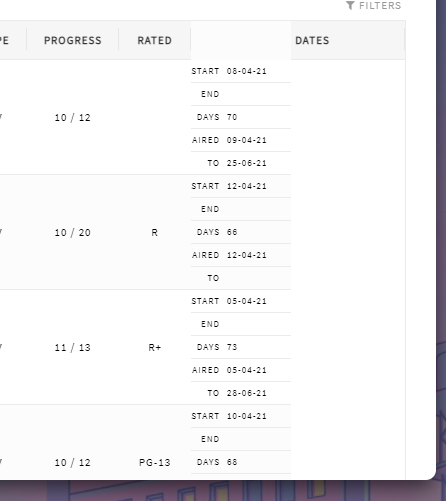 /* Dates */ .data.started, .data.finished, .data.days, .data.airing-started, .data.airing-finished { position: relative; display: flex !important; width: 100px; height: 14px; flex-flow: row wrap; overflow: hidden; order: 25; color: var(--text); font-size: 9px; line-height: 14px; text-align: left !important; text-overflow: ellipsis; white-space: nowrap; } .data.started { top: 0px; } .data.finished { top: 0px; } .data.days { top: 0px; } .data.airing-started { top: 0px; } .data.airing-finished { top: 0px; } .data.started:before, .data.finished:before, .data.days:before, .data.airing-started:before, .data.airing-finished:before { display: inline-block; width: 29px; padding-right: 4px; border-right: 1px solid var(--text-dim); margin-right: 3px; flex: 0 0 auto; text-align: right; color: var(--text-dim); } .data.started:before { content: "Start"; } .data.finished:before { content: "End"; } .data.days:before { content: "Days"; } .data.airing-started:before { content: "Aired"; } .manga .data.airing-started:before { content: "Issued"; } .data.airing-finished:before { content: "to"; } .header-title.started, .header-title.finished { position: absolute; width: 0 !important; padding: 0; } .header-title.started a, .header-title.finished a { width: 72px; text-align: right; font-size: 0 !important; letter-spacing: 0px; margin-left: 40px; } .list-table .list-table-header .header-title.days { width: 112px; font-size: 0; letter-spacing: 0px; text-align: left; } .header-title.days::after { content: " Dates"; font-size: 11px; letter-spacing: 1px; } |
DimitrovNJun 15, 2021 12:50 PM
Jun 16, 2021 1:02 AM
#66
DimitrovN said: Interesting, thanks for your help, it still looks somewhat weird though, how I have it right now I think it looks a lot better, but I am obviously having trouble combining the Dates column with the actual information, would you say this is (im)possible? /* Dates */ .data.started, .data.finished, .data.days, .data.airing-started, .data.airing-finished { position: relative; display: flex !important; width: 100px; height: 14px; flex-flow: row wrap; overflow: hidden; order: 25; color: var(--text); font-size: 9px; line-height: 14px; text-align: left !important; text-overflow: ellipsis; white-space: nowrap; } .data.started { top: 0px; } .data.finished { top: 0px; } .data.days { top: 0px; } .data.airing-started { top: 0px; } .data.airing-finished { top: 0px; } .data.started:before, .data.finished:before, .data.days:before, .data.airing-started:before, .data.airing-finished:before { display: inline-block; width: 29px; padding-right: 4px; border-right: 1px solid var(--text-dim); margin-right: 3px; flex: 0 0 auto; text-align: right; color: var(--text-dim); } .data.started:before { content: "Start"; } .data.finished:before { content: "End"; } .data.days:before { content: "Days"; } .data.airing-started:before { content: "Aired"; } .manga .data.airing-started:before { content: "Issued"; } .data.airing-finished:before { content: "to"; } .header-title.started, .header-title.finished { position: absolute; width: 0 !important; padding: 0; } .header-title.started a, .header-title.finished a { width: 72px; text-align: right; font-size: 0 !important; letter-spacing: 0px; margin-left: 40px; } .list-table .list-table-header .header-title.days { width: 112px; font-size: 0; letter-spacing: 0px; text-align: left; } .header-title.days::after { content: " Dates"; font-size: 11px; letter-spacing: 1px; } That should be possible. Here's my take on that code. Working with tables is a pain in the ass, but the "position: absolute" fixes some of our issues here. We just can't use the "top" value or they will get positioned outside of the table, so we have to use margin-top instead. This will position them from where they are. 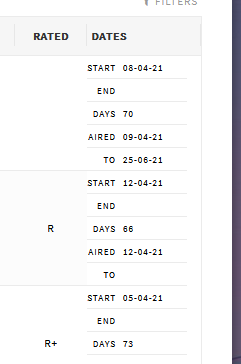 /* Dates */
.data.image {
height: 106px;
}
.data.started, .data.finished, .data.days, .data.airing-started, .data.airing-finished {
position: absolute;
display: flex !important;
width: 100px;
height: 14px;
flex-flow: row wrap;
overflow: hidden;
color: var(--text);
font-size: 9px;
line-height: 14px;
text-align: left !important;
text-overflow: ellipsis;
white-space: nowrap;
}
.data.started { margin-top: 0px; }
.data.finished { margin-top: 23px; }
.data.days { margin-top: 46px; }
.data.airing-started { margin-top: 69px; }
.data.airing-finished { margin-top: 92px; }
.data.started:before, .data.finished:before, .data.days:before, .data.airing-started:before, .data.airing-finished:before {
display: inline-block;
width: 29px;
padding-right: 4px;
border-right: 1px solid var(--text-dim);
margin-right: 3px;
flex: 0 0 auto;
text-align: right;
color: var(--text-dim);
}
.data.started:before { content: "Start"; }
.data.finished:before { content: "End"; }
.data.days:before { content: "Days"; }
.data.airing-started:before { content: "Aired"; }
.manga .data.airing-started:before { content: "Issued"; }
.data.airing-finished:before { content: "to"; }
.header-title.started,
.header-title.finished {
position: absolute;
width: 0 !important;
padding: 0;
}
.header-title.started a,
.header-title.finished a {
width: 72px;
text-align: right;
font-size: 0 !important;
letter-spacing: 0px;
margin-left: 40px;
}
.list-table .list-table-header .header-title.days {
width: 112px;
font-size: 0;
letter-spacing: 0px;
text-align: left;
}
.header-title.days::after {
content: " Dates";
font-size: 11px;
letter-spacing: 1px;
}View full difference here |
Jun 16, 2021 1:20 AM
#67
Valerio_Lyndon said: DimitrovN said: Interesting, thanks for your help, it still looks somewhat weird though, how I have it right now I think it looks a lot better, but I am obviously having trouble combining the Dates column with the actual information, would you say this is (im)possible? /* Dates */ .data.started, .data.finished, .data.days, .data.airing-started, .data.airing-finished { position: relative; display: flex !important; width: 100px; height: 14px; flex-flow: row wrap; overflow: hidden; order: 25; color: var(--text); font-size: 9px; line-height: 14px; text-align: left !important; text-overflow: ellipsis; white-space: nowrap; } .data.started { top: 0px; } .data.finished { top: 0px; } .data.days { top: 0px; } .data.airing-started { top: 0px; } .data.airing-finished { top: 0px; } .data.started:before, .data.finished:before, .data.days:before, .data.airing-started:before, .data.airing-finished:before { display: inline-block; width: 29px; padding-right: 4px; border-right: 1px solid var(--text-dim); margin-right: 3px; flex: 0 0 auto; text-align: right; color: var(--text-dim); } .data.started:before { content: "Start"; } .data.finished:before { content: "End"; } .data.days:before { content: "Days"; } .data.airing-started:before { content: "Aired"; } .manga .data.airing-started:before { content: "Issued"; } .data.airing-finished:before { content: "to"; } .header-title.started, .header-title.finished { position: absolute; width: 0 !important; padding: 0; } .header-title.started a, .header-title.finished a { width: 72px; text-align: right; font-size: 0 !important; letter-spacing: 0px; margin-left: 40px; } .list-table .list-table-header .header-title.days { width: 112px; font-size: 0; letter-spacing: 0px; text-align: left; } .header-title.days::after { content: " Dates"; font-size: 11px; letter-spacing: 1px; } That should be possible. Here's my take on that code. Working with tables is a pain in the ass, but the "position: absolute" fixes some of our issues here. We just can't use the "top" value or they will get positioned outside of the table, so we have to use margin-top instead. This will position them from where they are. /* Dates */
.data.image {
height: 106px;
}
.data.started, .data.finished, .data.days, .data.airing-started, .data.airing-finished {
position: absolute;
display: flex !important;
width: 100px;
height: 14px;
flex-flow: row wrap;
overflow: hidden;
color: var(--text);
font-size: 9px;
line-height: 14px;
text-align: left !important;
text-overflow: ellipsis;
white-space: nowrap;
}
.data.started { margin-top: 0px; }
.data.finished { margin-top: 23px; }
.data.days { margin-top: 46px; }
.data.airing-started { margin-top: 69px; }
.data.airing-finished { margin-top: 92px; }
.data.started:before, .data.finished:before, .data.days:before, .data.airing-started:before, .data.airing-finished:before {
display: inline-block;
width: 29px;
padding-right: 4px;
border-right: 1px solid var(--text-dim);
margin-right: 3px;
flex: 0 0 auto;
text-align: right;
color: var(--text-dim);
}
.data.started:before { content: "Start"; }
.data.finished:before { content: "End"; }
.data.days:before { content: "Days"; }
.data.airing-started:before { content: "Aired"; }
.manga .data.airing-started:before { content: "Issued"; }
.data.airing-finished:before { content: "to"; }
.header-title.started,
.header-title.finished {
position: absolute;
width: 0 !important;
padding: 0;
}
.header-title.started a,
.header-title.finished a {
width: 72px;
text-align: right;
font-size: 0 !important;
letter-spacing: 0px;
margin-left: 40px;
}
.list-table .list-table-header .header-title.days {
width: 112px;
font-size: 0;
letter-spacing: 0px;
text-align: left;
}
.header-title.days::after {
content: " Dates";
font-size: 11px;
letter-spacing: 1px;
}View full difference here Amazing! Thanks a lot, I don't know if I could have combined them myself :p Now I just aligned "DAYS" to the center, also removing the space in front of it. And I changed the width of the "DAYS" column from 112px to 100px and the width of the small lines from 100px to 90px to make it look exaclty how I imagined it. 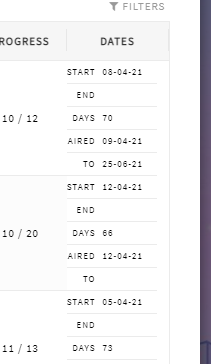 /* Dates */ .data.image { height: 106px; } .data.started, .data.finished, .data.days, .data.airing-started, .data.airing-finished { position: absolute; display: flex !important; width: 90px; height: 14px; flex-flow: row wrap; overflow: hidden; color: var(--text); font-size: 9px; line-height: 14px; text-align: left !important; text-overflow: ellipsis; white-space: nowrap; } .data.started { margin-top: 0px; } .data.finished { margin-top: 23px; } .data.days { margin-top: 46px; } .data.airing-started { margin-top: 69px; } .data.airing-finished { margin-top: 92px; } .data.started:before, .data.finished:before, .data.days:before, .data.airing-started:before, .data.airing-finished:before { display: inline-block; width: 29px; padding-right: 4px; border-right: 1px solid var(--text-dim); margin-right: 3px; flex: 0 0 auto; text-align: right; color: var(--text-dim); } .data.started:before { content: "Start"; } .data.finished:before { content: "End"; } .data.days:before { content: "Days"; } .data.airing-started:before { content: "Aired"; } .manga .data.airing-started:before { content: "Issued"; } .data.airing-finished:before { content: "to"; } .header-title.started, .header-title.finished { position: absolute; width: 0 !important; padding: 0; } .header-title.started a, .header-title.finished a { width: 72px; text-align: right; font-size: 0 !important; letter-spacing: 0px; margin-left: 40px; } .list-table .list-table-header .header-title.days { width: 100px; font-size: 0; letter-spacing: 0px; text-align: center; } .header-title.days::after { content: "Dates"; font-size: 11px; letter-spacing: 1px; } Again thanks a lot! |
DimitrovNJun 16, 2021 1:46 AM
Jun 16, 2021 2:03 AM
#68
Jun 19, 2021 12:52 PM
#69

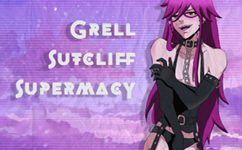
| Is there any way to add that plus (+) button for adding episodes? |
 |
Jun 19, 2021 1:11 PM
#70
fuck_my_life_707 said: Is there any way to add that plus (+) button for adding episodes? This brings it back .icon-add-episode{display: inherit !important; } |
|
Jun 19, 2021 1:22 PM
#71
DimitrovN said: Valerio_Lyndon said: DimitrovN said: Interesting, thanks for your help, it still looks somewhat weird though, how I have it right now I think it looks a lot better, but I am obviously having trouble combining the Dates column with the actual information, would you say this is (im)possible? /* Dates */ .data.started, .data.finished, .data.days, .data.airing-started, .data.airing-finished { position: relative; display: flex !important; width: 100px; height: 14px; flex-flow: row wrap; overflow: hidden; order: 25; color: var(--text); font-size: 9px; line-height: 14px; text-align: left !important; text-overflow: ellipsis; white-space: nowrap; } .data.started { top: 0px; } .data.finished { top: 0px; } .data.days { top: 0px; } .data.airing-started { top: 0px; } .data.airing-finished { top: 0px; } .data.started:before, .data.finished:before, .data.days:before, .data.airing-started:before, .data.airing-finished:before { display: inline-block; width: 29px; padding-right: 4px; border-right: 1px solid var(--text-dim); margin-right: 3px; flex: 0 0 auto; text-align: right; color: var(--text-dim); } .data.started:before { content: "Start"; } .data.finished:before { content: "End"; } .data.days:before { content: "Days"; } .data.airing-started:before { content: "Aired"; } .manga .data.airing-started:before { content: "Issued"; } .data.airing-finished:before { content: "to"; } .header-title.started, .header-title.finished { position: absolute; width: 0 !important; padding: 0; } .header-title.started a, .header-title.finished a { width: 72px; text-align: right; font-size: 0 !important; letter-spacing: 0px; margin-left: 40px; } .list-table .list-table-header .header-title.days { width: 112px; font-size: 0; letter-spacing: 0px; text-align: left; } .header-title.days::after { content: " Dates"; font-size: 11px; letter-spacing: 1px; } That should be possible. Here's my take on that code. Working with tables is a pain in the ass, but the "position: absolute" fixes some of our issues here. We just can't use the "top" value or they will get positioned outside of the table, so we have to use margin-top instead. This will position them from where they are. /* Dates */
.data.image {
height: 106px;
}
.data.started, .data.finished, .data.days, .data.airing-started, .data.airing-finished {
position: absolute;
display: flex !important;
width: 100px;
height: 14px;
flex-flow: row wrap;
overflow: hidden;
color: var(--text);
font-size: 9px;
line-height: 14px;
text-align: left !important;
text-overflow: ellipsis;
white-space: nowrap;
}
.data.started { margin-top: 0px; }
.data.finished { margin-top: 23px; }
.data.days { margin-top: 46px; }
.data.airing-started { margin-top: 69px; }
.data.airing-finished { margin-top: 92px; }
.data.started:before, .data.finished:before, .data.days:before, .data.airing-started:before, .data.airing-finished:before {
display: inline-block;
width: 29px;
padding-right: 4px;
border-right: 1px solid var(--text-dim);
margin-right: 3px;
flex: 0 0 auto;
text-align: right;
color: var(--text-dim);
}
.data.started:before { content: "Start"; }
.data.finished:before { content: "End"; }
.data.days:before { content: "Days"; }
.data.airing-started:before { content: "Aired"; }
.manga .data.airing-started:before { content: "Issued"; }
.data.airing-finished:before { content: "to"; }
.header-title.started,
.header-title.finished {
position: absolute;
width: 0 !important;
padding: 0;
}
.header-title.started a,
.header-title.finished a {
width: 72px;
text-align: right;
font-size: 0 !important;
letter-spacing: 0px;
margin-left: 40px;
}
.list-table .list-table-header .header-title.days {
width: 112px;
font-size: 0;
letter-spacing: 0px;
text-align: left;
}
.header-title.days::after {
content: " Dates";
font-size: 11px;
letter-spacing: 1px;
}View full difference here Amazing! Thanks a lot, I don't know if I could have combined them myself :p Now I just aligned "DAYS" to the center, also removing the space in front of it. And I changed the width of the "DAYS" column from 112px to 100px and the width of the small lines from 100px to 90px to make it look exaclty how I imagined it. /* Dates */ .data.image { height: 106px; } .data.started, .data.finished, .data.days, .data.airing-started, .data.airing-finished { position: absolute; display: flex !important; width: 90px; height: 14px; flex-flow: row wrap; overflow: hidden; color: var(--text); font-size: 9px; line-height: 14px; text-align: left !important; text-overflow: ellipsis; white-space: nowrap; } .data.started { margin-top: 0px; } .data.finished { margin-top: 23px; } .data.days { margin-top: 46px; } .data.airing-started { margin-top: 69px; } .data.airing-finished { margin-top: 92px; } .data.started:before, .data.finished:before, .data.days:before, .data.airing-started:before, .data.airing-finished:before { display: inline-block; width: 29px; padding-right: 4px; border-right: 1px solid var(--text-dim); margin-right: 3px; flex: 0 0 auto; text-align: right; color: var(--text-dim); } .data.started:before { content: "Start"; } .data.finished:before { content: "End"; } .data.days:before { content: "Days"; } .data.airing-started:before { content: "Aired"; } .manga .data.airing-started:before { content: "Issued"; } .data.airing-finished:before { content: "to"; } .header-title.started, .header-title.finished { position: absolute; width: 0 !important; padding: 0; } .header-title.started a, .header-title.finished a { width: 72px; text-align: right; font-size: 0 !important; letter-spacing: 0px; margin-left: 40px; } .list-table .list-table-header .header-title.days { width: 100px; font-size: 0; letter-spacing: 0px; text-align: center; } .header-title.days::after { content: "Dates"; font-size: 11px; letter-spacing: 1px; } Again thanks a lot! Thanks, I added your code to the OP and credited you |
|
Jun 20, 2021 12:40 AM
#72
Shishio-kun said: DimitrovN said: Valerio_Lyndon said: DimitrovN said: Interesting, thanks for your help, it still looks somewhat weird though, how I have it right now I think it looks a lot better, but I am obviously having trouble combining the Dates column with the actual information, would you say this is (im)possible? /* Dates */ .data.started, .data.finished, .data.days, .data.airing-started, .data.airing-finished { position: relative; display: flex !important; width: 100px; height: 14px; flex-flow: row wrap; overflow: hidden; order: 25; color: var(--text); font-size: 9px; line-height: 14px; text-align: left !important; text-overflow: ellipsis; white-space: nowrap; } .data.started { top: 0px; } .data.finished { top: 0px; } .data.days { top: 0px; } .data.airing-started { top: 0px; } .data.airing-finished { top: 0px; } .data.started:before, .data.finished:before, .data.days:before, .data.airing-started:before, .data.airing-finished:before { display: inline-block; width: 29px; padding-right: 4px; border-right: 1px solid var(--text-dim); margin-right: 3px; flex: 0 0 auto; text-align: right; color: var(--text-dim); } .data.started:before { content: "Start"; } .data.finished:before { content: "End"; } .data.days:before { content: "Days"; } .data.airing-started:before { content: "Aired"; } .manga .data.airing-started:before { content: "Issued"; } .data.airing-finished:before { content: "to"; } .header-title.started, .header-title.finished { position: absolute; width: 0 !important; padding: 0; } .header-title.started a, .header-title.finished a { width: 72px; text-align: right; font-size: 0 !important; letter-spacing: 0px; margin-left: 40px; } .list-table .list-table-header .header-title.days { width: 112px; font-size: 0; letter-spacing: 0px; text-align: left; } .header-title.days::after { content: " Dates"; font-size: 11px; letter-spacing: 1px; } That should be possible. Here's my take on that code. Working with tables is a pain in the ass, but the "position: absolute" fixes some of our issues here. We just can't use the "top" value or they will get positioned outside of the table, so we have to use margin-top instead. This will position them from where they are. /* Dates */
.data.image {
height: 106px;
}
.data.started, .data.finished, .data.days, .data.airing-started, .data.airing-finished {
position: absolute;
display: flex !important;
width: 100px;
height: 14px;
flex-flow: row wrap;
overflow: hidden;
color: var(--text);
font-size: 9px;
line-height: 14px;
text-align: left !important;
text-overflow: ellipsis;
white-space: nowrap;
}
.data.started { margin-top: 0px; }
.data.finished { margin-top: 23px; }
.data.days { margin-top: 46px; }
.data.airing-started { margin-top: 69px; }
.data.airing-finished { margin-top: 92px; }
.data.started:before, .data.finished:before, .data.days:before, .data.airing-started:before, .data.airing-finished:before {
display: inline-block;
width: 29px;
padding-right: 4px;
border-right: 1px solid var(--text-dim);
margin-right: 3px;
flex: 0 0 auto;
text-align: right;
color: var(--text-dim);
}
.data.started:before { content: "Start"; }
.data.finished:before { content: "End"; }
.data.days:before { content: "Days"; }
.data.airing-started:before { content: "Aired"; }
.manga .data.airing-started:before { content: "Issued"; }
.data.airing-finished:before { content: "to"; }
.header-title.started,
.header-title.finished {
position: absolute;
width: 0 !important;
padding: 0;
}
.header-title.started a,
.header-title.finished a {
width: 72px;
text-align: right;
font-size: 0 !important;
letter-spacing: 0px;
margin-left: 40px;
}
.list-table .list-table-header .header-title.days {
width: 112px;
font-size: 0;
letter-spacing: 0px;
text-align: left;
}
.header-title.days::after {
content: " Dates";
font-size: 11px;
letter-spacing: 1px;
}View full difference here Amazing! Thanks a lot, I don't know if I could have combined them myself :p Now I just aligned "DAYS" to the center, also removing the space in front of it. And I changed the width of the "DAYS" column from 112px to 100px and the width of the small lines from 100px to 90px to make it look exaclty how I imagined it. /* Dates */ .data.image { height: 106px; } .data.started, .data.finished, .data.days, .data.airing-started, .data.airing-finished { position: absolute; display: flex !important; width: 90px; height: 14px; flex-flow: row wrap; overflow: hidden; color: var(--text); font-size: 9px; line-height: 14px; text-align: left !important; text-overflow: ellipsis; white-space: nowrap; } .data.started { margin-top: 0px; } .data.finished { margin-top: 23px; } .data.days { margin-top: 46px; } .data.airing-started { margin-top: 69px; } .data.airing-finished { margin-top: 92px; } .data.started:before, .data.finished:before, .data.days:before, .data.airing-started:before, .data.airing-finished:before { display: inline-block; width: 29px; padding-right: 4px; border-right: 1px solid var(--text-dim); margin-right: 3px; flex: 0 0 auto; text-align: right; color: var(--text-dim); } .data.started:before { content: "Start"; } .data.finished:before { content: "End"; } .data.days:before { content: "Days"; } .data.airing-started:before { content: "Aired"; } .manga .data.airing-started:before { content: "Issued"; } .data.airing-finished:before { content: "to"; } .header-title.started, .header-title.finished { position: absolute; width: 0 !important; padding: 0; } .header-title.started a, .header-title.finished a { width: 72px; text-align: right; font-size: 0 !important; letter-spacing: 0px; margin-left: 40px; } .list-table .list-table-header .header-title.days { width: 100px; font-size: 0; letter-spacing: 0px; text-align: center; } .header-title.days::after { content: "Dates"; font-size: 11px; letter-spacing: 1px; } Again thanks a lot! Thanks, I added your code to the OP and credited you Cool, thanks! But isnt my code right in the middle of Valerio_Lyndon's 2 blocks of code atm? Don't know if that intentional or not. xd |
Jun 20, 2021 5:49 AM
#73
DimitrovN said: Shishio-kun said: DimitrovN said: Valerio_Lyndon said: DimitrovN said: Interesting, thanks for your help, it still looks somewhat weird though, how I have it right now I think it looks a lot better, but I am obviously having trouble combining the Dates column with the actual information, would you say this is (im)possible? /* Dates */ .data.started, .data.finished, .data.days, .data.airing-started, .data.airing-finished { position: relative; display: flex !important; width: 100px; height: 14px; flex-flow: row wrap; overflow: hidden; order: 25; color: var(--text); font-size: 9px; line-height: 14px; text-align: left !important; text-overflow: ellipsis; white-space: nowrap; } .data.started { top: 0px; } .data.finished { top: 0px; } .data.days { top: 0px; } .data.airing-started { top: 0px; } .data.airing-finished { top: 0px; } .data.started:before, .data.finished:before, .data.days:before, .data.airing-started:before, .data.airing-finished:before { display: inline-block; width: 29px; padding-right: 4px; border-right: 1px solid var(--text-dim); margin-right: 3px; flex: 0 0 auto; text-align: right; color: var(--text-dim); } .data.started:before { content: "Start"; } .data.finished:before { content: "End"; } .data.days:before { content: "Days"; } .data.airing-started:before { content: "Aired"; } .manga .data.airing-started:before { content: "Issued"; } .data.airing-finished:before { content: "to"; } .header-title.started, .header-title.finished { position: absolute; width: 0 !important; padding: 0; } .header-title.started a, .header-title.finished a { width: 72px; text-align: right; font-size: 0 !important; letter-spacing: 0px; margin-left: 40px; } .list-table .list-table-header .header-title.days { width: 112px; font-size: 0; letter-spacing: 0px; text-align: left; } .header-title.days::after { content: " Dates"; font-size: 11px; letter-spacing: 1px; } That should be possible. Here's my take on that code. Working with tables is a pain in the ass, but the "position: absolute" fixes some of our issues here. We just can't use the "top" value or they will get positioned outside of the table, so we have to use margin-top instead. This will position them from where they are. /* Dates */
.data.image {
height: 106px;
}
.data.started, .data.finished, .data.days, .data.airing-started, .data.airing-finished {
position: absolute;
display: flex !important;
width: 100px;
height: 14px;
flex-flow: row wrap;
overflow: hidden;
color: var(--text);
font-size: 9px;
line-height: 14px;
text-align: left !important;
text-overflow: ellipsis;
white-space: nowrap;
}
.data.started { margin-top: 0px; }
.data.finished { margin-top: 23px; }
.data.days { margin-top: 46px; }
.data.airing-started { margin-top: 69px; }
.data.airing-finished { margin-top: 92px; }
.data.started:before, .data.finished:before, .data.days:before, .data.airing-started:before, .data.airing-finished:before {
display: inline-block;
width: 29px;
padding-right: 4px;
border-right: 1px solid var(--text-dim);
margin-right: 3px;
flex: 0 0 auto;
text-align: right;
color: var(--text-dim);
}
.data.started:before { content: "Start"; }
.data.finished:before { content: "End"; }
.data.days:before { content: "Days"; }
.data.airing-started:before { content: "Aired"; }
.manga .data.airing-started:before { content: "Issued"; }
.data.airing-finished:before { content: "to"; }
.header-title.started,
.header-title.finished {
position: absolute;
width: 0 !important;
padding: 0;
}
.header-title.started a,
.header-title.finished a {
width: 72px;
text-align: right;
font-size: 0 !important;
letter-spacing: 0px;
margin-left: 40px;
}
.list-table .list-table-header .header-title.days {
width: 112px;
font-size: 0;
letter-spacing: 0px;
text-align: left;
}
.header-title.days::after {
content: " Dates";
font-size: 11px;
letter-spacing: 1px;
}View full difference here Amazing! Thanks a lot, I don't know if I could have combined them myself :p Now I just aligned "DAYS" to the center, also removing the space in front of it. And I changed the width of the "DAYS" column from 112px to 100px and the width of the small lines from 100px to 90px to make it look exaclty how I imagined it. /* Dates */ .data.image { height: 106px; } .data.started, .data.finished, .data.days, .data.airing-started, .data.airing-finished { position: absolute; display: flex !important; width: 90px; height: 14px; flex-flow: row wrap; overflow: hidden; color: var(--text); font-size: 9px; line-height: 14px; text-align: left !important; text-overflow: ellipsis; white-space: nowrap; } .data.started { margin-top: 0px; } .data.finished { margin-top: 23px; } .data.days { margin-top: 46px; } .data.airing-started { margin-top: 69px; } .data.airing-finished { margin-top: 92px; } .data.started:before, .data.finished:before, .data.days:before, .data.airing-started:before, .data.airing-finished:before { display: inline-block; width: 29px; padding-right: 4px; border-right: 1px solid var(--text-dim); margin-right: 3px; flex: 0 0 auto; text-align: right; color: var(--text-dim); } .data.started:before { content: "Start"; } .data.finished:before { content: "End"; } .data.days:before { content: "Days"; } .data.airing-started:before { content: "Aired"; } .manga .data.airing-started:before { content: "Issued"; } .data.airing-finished:before { content: "to"; } .header-title.started, .header-title.finished { position: absolute; width: 0 !important; padding: 0; } .header-title.started a, .header-title.finished a { width: 72px; text-align: right; font-size: 0 !important; letter-spacing: 0px; margin-left: 40px; } .list-table .list-table-header .header-title.days { width: 100px; font-size: 0; letter-spacing: 0px; text-align: center; } .header-title.days::after { content: "Dates"; font-size: 11px; letter-spacing: 1px; } Again thanks a lot! Thanks, I added your code to the OP and credited you Cool, thanks! But isnt my code right in the middle of Valerio_Lyndon's 2 blocks of code atm? Don't know if that intentional or not. xd I put his codes first then your two posts second so I thought I separated them based on what I read, but I edited it so it just links to Valerio's post from the OP and ppl can figure it out and try both your codes from there so there's no confusion |
|
Jul 10, 2021 6:21 AM
#74

Hey, my tags are automatically capitalized, is there a way I can make them lowercase? |
Jul 10, 2021 7:24 AM
#75
add .list-table .list-table-data .data.tags { text-transform: initial; } |
|
Jul 10, 2021 8:03 AM
#76
| @Shishio-kun it worked! thanks a lot :) |
Aug 22, 2021 11:54 AM
#77
| Is there any way i can make the headers transparent? (I mean the completed etc) Also how can i remove the ''filter''? |
Aug 22, 2021 2:40 PM
#78

GeTxLeFt said: Is there any way i can make the headers transparent? (I mean the completed etc) Also how can i remove the ''filter''? sure, it's pretty easy with basic CSS code and inspecting the element https://www.youtube.com/watch?v=cTGbVutdqfc .status-menu-container {
background-color: transparent !important;
}
.header .header-title {
background: transparent 15px 2px/50px no-repeat url(https://image.myanimelist.net/ui/fkLITaJTefafxFKPGRzngvQqHPDcc6jatqmY_RHEj9-Z8-4goIa5WgKMI8CQvYLg) !important;
}
#advanced-options-button {
display: none !important;
} |
ShaggyZEAug 22, 2021 2:59 PM
   My Userscripts - Themes - Userstyles - Extensions (Chrome/Firefox) [API CSS] MAL-Scraper-API Cover/CSS Generator |
Aug 22, 2021 3:33 PM
#79
ShaggyZE said: GeTxLeFt said: Is there any way i can make the headers transparent? (I mean the completed etc) Also how can i remove the ''filter''? sure, it's pretty easy with basic CSS code and inspecting the element https://www.youtube.com/watch?v=cTGbVutdqfc .status-menu-container {
background-color: transparent !important;
}
.header .header-title {
background: transparent 15px 2px/50px no-repeat url(https://image.myanimelist.net/ui/fkLITaJTefafxFKPGRzngvQqHPDcc6jatqmY_RHEj9-Z8-4goIa5WgKMI8CQvYLg) !important;
}
#advanced-options-button {
display: none !important;
}Nothing happened heres my code /* "Dashboard" * List design by 5cm * Modified by Valerio Lyndon and Shishio-Kun */ @\import "https://fonts.googleapis.com/css?family=Source+Sans+Pro"; :root { --background: fixed center/cover url(https://wallpapercave.com/wp/wp4979757.jpg); } body { background: var(--background) !important; width: 1058px; font: 11px Source Sans Pro; letter-spacing: 1px; text-transform: uppercase; padding: 70px 0 0; margin: auto; color: white; } body::before, body::after { content: ""; position: fixed; top: 68px; left: calc(50% - 529px); width: 1058px; height: 541px; border-radius: 10px; pointer-events: none; } body::before { z-index: 60; background: rgba(5,5,5,.5); } body::after { z-index: 110; box-shadow: 0 8px 20px rgba(0,0,0,.6); } a {color: white;} #header-menu-button .fa, [data-owner=""] .list-menu-float, .cover-block, .list-menu-float .icon-menu.export, .list-menu-float .icon-menu.setting svg.icon-setting, .list-unit .list-status-title .text, #show-stats-button, .list-unit:not(.all_anime) .status, .icon-watch.ml4,[data-owner=""] .add-edit-more span, .more, .list-table .list-table-data .tags .edit, .list-unit:not(.watching) .icon-add-episode {display: none;} .header { position: fixed; top: 0; height: 68px; z-index: 100; background: var(--background); } .header .header-title {background: #333 15px 2px/50px no-repeat url(https://image.myanimelist.net/ui/fkLITaJTefafxFKPGRzngvQqHPDcc6jatqmY_RHEj9-Z8-4goIa5WgKMI8CQvYLg); width: 160px; height: 50px; top: 68px; z-index: 2; border-radius: 10px 0 0; border-bottom: 1px solid #555;} .header .header-title:hover {background-color: #222;} .header .header-menu.other {width: 160px; top: 118px; left: 0; z-index:2;} [data-owner=""] .header .header-menu .btn-menu, .header .header-menu .header-info {font-size: 0; text-align: left; margin: 0;} .header .header-menu .header-info {margin-top: 50px;} #header-menu-button, .anime .list-menu-float .icon-menu.anime-list, .anime .list-menu-float .icon-menu.anime-list svg, .anime .list-menu-float .icon-menu.anime-list .text, .anime .list-menu-float .icon-menu.anime-list:hover, .manga .list-menu-float .icon-menu.manga-list, .manga .list-menu-float .icon-menu.manga-list svg, .manga .list-menu-float .icon-menu.manga-list .text, .manga .list-menu-float .icon-menu.manga-list:hover { background-color: transparent; color: #333 !important; fill: #333;} #header-menu-button:before {content: ''; display: inline-block; width: 13px; height: 12px; margin: 0 10px 0 20px;} .anime #header-menu-button:before {background: left/cover url(https://image.myanimelist.net/ui/psYiTUtmhCM147Lw1c2IfEdpMGgqTXOAV7TUBQQzrxk9HddL_-Sx7EGuKbYvYuAf);} .manga #header-menu-button:before {background: left/cover url(https://image.myanimelist.net/ui/psYiTUtmhCM147Lw1c2IfEH4MpovaYtG8IwnuF48Imc3YkKXdBZRhkHFhaL-Jc1D);} .header a, .header .header-menu .list-menu .icon-menu {display: block; width: 160px; height: 50px; transition: none;} .header .header-menu .list-menu {top: 100px; left: 0; background: none; display: block!important; border: 0; box-shadow: none;} .header .header-menu .list-menu .icon-menu .text {left: 48px; top: 0; font-size: 11px; color: #999;} .header-info [href*=shared]:before {font: 14px FontAwesome; content: '\f0ec'; padding: 0 11px 0 20px;} .fa.fa-history {padding: 0 6px 0 21px; font-size: 16px;} .header-info [href*=login] {border-top: 1px solid #555;} .header-info [href*=login]:before {font: 17px FontAwesome; content: '\f090'; padding: 0 12px 0 20px;} .header-info [href*=register]:before {font: 14px FontAwesome; content: '\f234';padding: 0 12px 0 20px;} .header-info [href*=register]:after {content: 'Register'; font-size: 11px; letter-spacing: 2px;} .header a, .header a.username:after, .list-menu-float .icon-menu.profile:after { content: 'Profile'; font: bold 11px Source Sans Pro; color: #999!important; line-height: 50px; letter-spacing: 2px;} .header a:not(.header-title):hover, .header a:not(.header-title):hover::before, .header a:not(.header-title):hover::after, .header .header-menu .list-menu .icon-menu:hover, .list-menu-float .icon-menu.profile:hover { background: #222; color: white !important; text-decoration: none;} .header a.username, .header-info [href*=register], .list-menu-float .icon-menu.setting .text .link-style-setting { font-size: 0; letter-spacing: 0;} .header a.username:before {content: '\f007'; font: 15px FontAwesome; padding: 0 15px 0 20px;} .header a.username:hover:after, .header .header-menu .list-menu .icon-menu:hover svg.icon, .header .header-menu .list-menu .icon-menu:hover .text, .list-menu-float .icon-menu.setting .text .link-style-setting:hover:before { fill: white; color: white;} .header .header-menu .list-menu .icon-menu svg.icon, .list-menu-float .icon-menu svg.icon { width: 15px; fill: #999; top: 15px!important; left: 20px!important;} .list-menu-float { position: fixed; top: 120px; left: calc(50% - 529px); width: 160px; border: 0; z-index: 80; } .list-menu-float .icon-menu {background: #333; width: 100%; transition: none;} .list-menu-float .icon-menu.profile {background-image: none!important; width: 110px; padding-left: 50px; text-align: left;} .list-menu-float .icon-menu.profile:before {content: '\f007'; font: 15px FontAwesome; color: #999; position: absolute; top: 17px; left: 22px;} .list-menu-float .icon-menu .text {font: bold 11px Source Sans Pro; color: #999; letter-spacing: 2px; width: auto; top: 18px; opacity: 1; transition: none;} .list-menu-float .icon-menu.setting .text {left: 0; width: 100%; height: auto; text-align: left; opacity: 1;} .list-menu-float .icon-menu.setting .text .link-list-setting, .list-menu-float .icon-menu.setting .text .link-style-setting, .list-menu-float .icon-menu.setting:hover .text, .list-menu-float .icon-menu.setting:hover .text .link-list-setting, .list-menu-float .icon-menu.setting:hover .text .link-style-setting { background: #333; width: 100%; color: #999; line-height: 50px; border: 0; opacity: 1;} .list-menu-float .icon-menu:not(.profile):hover, .list-menu-float .icon-menu.setting .text .link-list-setting:hover, .list-menu-float .icon-menu.setting .text .link-style-setting:hover { background: #222; width: 100%; color: white;} .list-menu-float .icon-menu.profile:hover { background: #222; color: white; } .list-menu-float .icon-menu.profile:hover::before, .list-menu-float .icon-menu.profile:hover::after { color: white !important; } .list-menu-float .icon-menu.profile:hover:before, .list-menu-float .icon-menu.setting .text .link-list-setting:hover:before, .list-menu-float .icon-menu.profile:hover:after, .list-menu-float .icon-menu:hover .text {width: auto; color: white;} .list-menu-float .icon-menu.setting .text .link-list-setting {padding-left: 50px;} .list-menu-float .icon-menu.setting .text .link-style-setting:after { content:'List style'; font-size: 11px; letter-spacing: 2px; padding-left: 50px;} .list-menu-float .icon-menu.setting .text .link-list-setting:before { content: '\f013'; font: 16px FontAwesome; color: #999; position: absolute; margin:17px 0 0 -29px;} .list-menu-float .icon-menu.setting .text .link-style-setting:before { content: '\f1fc'; font: 14px FontAwesome; color: #999; position: absolute; margin: 17px 21px;} .list-container { margin-top: -2px; z-index: 70; padding-top: 51px; background: none; border: 0;} [data-owner=""] .list-container {margin-top: -2px;} .list-block, .status-menu-container.fixed + div.list-block {margin: 0; min-height: auto;} .list-unit { width: auto; margin-left: 160px; padding: 10px 30px calc(100vh - 609px); background: none; border-radius: 0 0 10px;} .status-menu-container, .status-menu-container.fixed { position: fixed; top: 68px; left: calc(50% - 369px); width: 898px; height: 50px; border-radius: 0 10px 0 0; } .status-menu-container .status-menu { height: 100%; margin-left: 0; border-spacing: 36px 0; } .status-menu-container .status-menu .status-button {font: bold 11px Source Sans Pro; letter-spacing: 2px;} .status-menu-container .status-menu .status-button.on {font-size: 12px; color: black;} .status-menu-container .status-menu .status-button:after {height: 2px;} .status-menu-container .status-menu .status-button.all_anime:after {background: #222;} .status-menu-container .status-menu .status-button.watching:after {background-color: #2db039;} .status-menu-container .status-menu .status-button.plantowatch:after {background-color: #c3c3c3;} .status-menu-container .status-menu .status-button.completed:after {background-color: #26448f;} .status-menu-container .status-menu .status-button.onhold:after {background-color: #f1c83e;} .status-menu-container .status-menu .status-button.dropped:after {background-color: #a12f31;} .status-menu-container .search-container #search-box input {font: 11px Source Sans Pro; color: #999; letter-spacing: 1px; padding: 0 8px; border-radius: 10px; border: 1px solid #ccc;} .list-unit .list-status-title {width: 100%; height: 20px; background:none;} .list-unit .list-status-title .stats {height: auto; line-height: 0;} .list-unit .list-status-title .stats a {color: #999; margin: 0;} .list-table .list-table-header .header-title, .list-table .list-table-header .header-title .link.sort, .list-table .list-table-header .header-title .link.sort:hover {color: grey;} .list-table .list-table-header .header-title.status, .list-table .list-table-data .data.status {width: 2px; padding: 0;background: ;} .list-table .list-table-data .data.title, .list-table .list-table-data .data.studio {height: 40px; line-height: 1.2em;} .list-table .list-table-data .data.title .link {font-size: 11px;} .list-table .list-table-data .data.title .add-edit-more {float: none; display: inline-block; height: 0; font-size: 0; white-space: nowrap; margin-left: 5px; opacity: 0;} .list-table .list-table-data .data.title:hover .add-edit-more {opacity: 1;} .list-table .list-table-data .data.title .content-status {font-size: 9px; font-style: italic;} .list-table .list-table-data a:not(.edit-disabled):hover {text-decoration: none; background: #444; color: white;} .add a, .edit a, .list-table .list-table-data .data.tags {font-size: 8px; line-height:1em;} .list-unit .loading-space {margin: 5px;} footer { position: fixed; top: 609px; left: 0; z-index: 100; width: 100%; height: calc(100% - 609px); background: var(--background); } #footer-block {background: none; padding: 20px;} #copyright {font: 9px Source Sans Pro; color: white; text-shadow: 1px 1px 2px #333; padding-top: 15px;} #copyright:before {content: 'Designed by 5cm.';} This at the bottom should fix the tags .data.tags span, .data.tags span a, .list-table .list-table-data .data.tags, .list-table .list-table-data .data.tags a{ text-transform: none !important; } #header-menu-button, .anime .list-menu-float .icon-menu.anime-list, .anime .list-menu-float .icon-menu.anime-list svg, .anime .list-menu-float .icon-menu.anime-list .text, .anime .list-menu-float .icon-menu.anime-list:hover, .manga .list-menu-float .icon-menu.manga-list, .manga .list-menu-float .icon-menu.manga-list svg, .manga .list-menu-float .icon-menu.manga-list .text, .manga .list-menu-float .icon-menu.manga-list:hover { background-color: transparent;} .status-menu-container { background-color: #333;} .status-menu-container { border-bottom: 0;} .list-table { border: 0; } .list-table > tbody:nth-of-type(2n+1) { background-color: transparent; } .list-table .list-table-data .data { border-bottom: 0; } .list-table .list-table-header .header-title { background: rgba(5,5,5,.5); } .list-table .list-table-header .header-title, .list-table .list-table-header .header-title .link.sort, .list-table .list-table-header .header-title .link.sort:hover { color: #9B9B9B; } .list-table .list-table-header .header-title .link { color: #9B9B9B; } .list-table .list-table-header .header-title:hover, .list-table .list-table-header .header-title .link.sort:hover, .list-table .list-table-header .header-title .link.sort:hover { color: white; } .list-table .list-table-header .header-title .link:hover { color: white; } .status-menu-container .status-menu .status-button.on { color: black; } .list-table .list-table-data a.edit-disabled { color: white; } .list-table .list-table-header .header-title { border-bottom: 0;} #header-menu-button, .anime .list-menu-float .icon-menu.anime-list, .anime .list-menu-float .icon-menu.anime-list svg, .anime .list-menu-float .icon-menu.anime-list .text, .anime .list-menu-float .icon-menu.anime-list:hover, .manga .list-menu-float .icon-menu.manga-list, .manga .list-menu-float .icon-menu.manga-list svg, .manga .list-menu-float .icon-menu.manga-list .text, .manga .list-menu-float .icon-menu.manga-list:hover { background-color: #333; color: white !important; fill: white; } .status-menu-container .status-menu .status-button.on { color: white; } .status-menu-container .status-menu .status-button:hover{ color: white; } .header a, .header .header-menu .list-menu .icon-menu{ background: #333; } body::before, body::after { height: 850px; } footer { top: 918px; height: 173px; } /* Make user menu transparent */ .header a:not(.header-title), .header .header-menu .list-menu .icon-menu, .header a:not(#header-menu-button)::before, .header a::after, .list-menu-float .icon-menu, .list-menu-float .icon-menu .text, .list-menu-float .icon-menu .icon, .list-menu-float .icon-menu.setting .text .link-list-setting, .list-menu-float .icon-menu.setting .text .link-style-setting, .list-menu-float .icon-menu.setting:hover .text, .list-menu-float .icon-menu.setting:hover .text .link-list-setting, .list-menu-float .icon-menu.setting:hover .text .link-style-setting { background: none !important; } .header .header-title { border-bottom: 0; } .icon-menu.setting { display: none; } .icon-menu.logout { display: none; } .list-unit { padding-bottom: calc(100vh - 950px); body { background-size: cover !important; } I just added yours in the bottom EDIT: I removed filter thanks for the video |
GeTxLeFtAug 22, 2021 3:58 PM
Aug 22, 2021 4:31 PM
#80
GeTxLeFt said: Nothing happened heres my code /* "Dashboard" * List design by 5cm * Modified by Valerio Lyndon and Shishio-Kun */ @\import "https://fonts.googleapis.com/css?family=Source+Sans+Pro"; :root { --background: fixed center/cover url(https://wallpapercave.com/wp/wp4979757.jpg); } body { background: var(--background) !important; width: 1058px; font: 11px Source Sans Pro; letter-spacing: 1px; text-transform: uppercase; padding: 70px 0 0; margin: auto; color: white; } body::before, body::after { content: ""; position: fixed; top: 68px; left: calc(50% - 529px); width: 1058px; height: 541px; border-radius: 10px; pointer-events: none; } body::before { z-index: 60; background: rgba(5,5,5,.5); } body::after { z-index: 110; box-shadow: 0 8px 20px rgba(0,0,0,.6); } a {color: white;} #header-menu-button .fa, [data-owner=""] .list-menu-float, .cover-block, .list-menu-float .icon-menu.export, .list-menu-float .icon-menu.setting svg.icon-setting, .list-unit .list-status-title .text, #show-stats-button, .list-unit:not(.all_anime) .status, .icon-watch.ml4,[data-owner=""] .add-edit-more span, .more, .list-table .list-table-data .tags .edit, .list-unit:not(.watching) .icon-add-episode {display: none;} .header { position: fixed; top: 0; height: 68px; z-index: 100; background: var(--background); } .header .header-title {background: #333 15px 2px/50px no-repeat url(https://image.myanimelist.net/ui/fkLITaJTefafxFKPGRzngvQqHPDcc6jatqmY_RHEj9-Z8-4goIa5WgKMI8CQvYLg); width: 160px; height: 50px; top: 68px; z-index: 2; border-radius: 10px 0 0; border-bottom: 1px solid #555;} .header .header-title:hover {background-color: #222;} .header .header-menu.other {width: 160px; top: 118px; left: 0; z-index:2;} [data-owner=""] .header .header-menu .btn-menu, .header .header-menu .header-info {font-size: 0; text-align: left; margin: 0;} .header .header-menu .header-info {margin-top: 50px;} #header-menu-button, .anime .list-menu-float .icon-menu.anime-list, .anime .list-menu-float .icon-menu.anime-list svg, .anime .list-menu-float .icon-menu.anime-list .text, .anime .list-menu-float .icon-menu.anime-list:hover, .manga .list-menu-float .icon-menu.manga-list, .manga .list-menu-float .icon-menu.manga-list svg, .manga .list-menu-float .icon-menu.manga-list .text, .manga .list-menu-float .icon-menu.manga-list:hover { background-color: transparent; color: #333 !important; fill: #333;} #header-menu-button:before {content: ''; display: inline-block; width: 13px; height: 12px; margin: 0 10px 0 20px;} .anime #header-menu-button:before {background: left/cover url(https://image.myanimelist.net/ui/psYiTUtmhCM147Lw1c2IfEdpMGgqTXOAV7TUBQQzrxk9HddL_-Sx7EGuKbYvYuAf);} .manga #header-menu-button:before {background: left/cover url(https://image.myanimelist.net/ui/psYiTUtmhCM147Lw1c2IfEH4MpovaYtG8IwnuF48Imc3YkKXdBZRhkHFhaL-Jc1D);} .header a, .header .header-menu .list-menu .icon-menu {display: block; width: 160px; height: 50px; transition: none;} .header .header-menu .list-menu {top: 100px; left: 0; background: none; display: block!important; border: 0; box-shadow: none;} .header .header-menu .list-menu .icon-menu .text {left: 48px; top: 0; font-size: 11px; color: #999;} .header-info [href*=shared]:before {font: 14px FontAwesome; content: '\f0ec'; padding: 0 11px 0 20px;} .fa.fa-history {padding: 0 6px 0 21px; font-size: 16px;} .header-info [href*=login] {border-top: 1px solid #555;} .header-info [href*=login]:before {font: 17px FontAwesome; content: '\f090'; padding: 0 12px 0 20px;} .header-info [href*=register]:before {font: 14px FontAwesome; content: '\f234';padding: 0 12px 0 20px;} .header-info [href*=register]:after {content: 'Register'; font-size: 11px; letter-spacing: 2px;} .header a, .header a.username:after, .list-menu-float .icon-menu.profile:after { content: 'Profile'; font: bold 11px Source Sans Pro; color: #999!important; line-height: 50px; letter-spacing: 2px;} .header a:not(.header-title):hover, .header a:not(.header-title):hover::before, .header a:not(.header-title):hover::after, .header .header-menu .list-menu .icon-menu:hover, .list-menu-float .icon-menu.profile:hover { background: #222; color: white !important; text-decoration: none;} .header a.username, .header-info [href*=register], .list-menu-float .icon-menu.setting .text .link-style-setting { font-size: 0; letter-spacing: 0;} .header a.username:before {content: '\f007'; font: 15px FontAwesome; padding: 0 15px 0 20px;} .header a.username:hover:after, .header .header-menu .list-menu .icon-menu:hover svg.icon, .header .header-menu .list-menu .icon-menu:hover .text, .list-menu-float .icon-menu.setting .text .link-style-setting:hover:before { fill: white; color: white;} .header .header-menu .list-menu .icon-menu svg.icon, .list-menu-float .icon-menu svg.icon { width: 15px; fill: #999; top: 15px!important; left: 20px!important;} .list-menu-float { position: fixed; top: 120px; left: calc(50% - 529px); width: 160px; border: 0; z-index: 80; } .list-menu-float .icon-menu {background: #333; width: 100%; transition: none;} .list-menu-float .icon-menu.profile {background-image: none!important; width: 110px; padding-left: 50px; text-align: left;} .list-menu-float .icon-menu.profile:before {content: '\f007'; font: 15px FontAwesome; color: #999; position: absolute; top: 17px; left: 22px;} .list-menu-float .icon-menu .text {font: bold 11px Source Sans Pro; color: #999; letter-spacing: 2px; width: auto; top: 18px; opacity: 1; transition: none;} .list-menu-float .icon-menu.setting .text {left: 0; width: 100%; height: auto; text-align: left; opacity: 1;} .list-menu-float .icon-menu.setting .text .link-list-setting, .list-menu-float .icon-menu.setting .text .link-style-setting, .list-menu-float .icon-menu.setting:hover .text, .list-menu-float .icon-menu.setting:hover .text .link-list-setting, .list-menu-float .icon-menu.setting:hover .text .link-style-setting { background: #333; width: 100%; color: #999; line-height: 50px; border: 0; opacity: 1;} .list-menu-float .icon-menu:not(.profile):hover, .list-menu-float .icon-menu.setting .text .link-list-setting:hover, .list-menu-float .icon-menu.setting .text .link-style-setting:hover { background: #222; width: 100%; color: white;} .list-menu-float .icon-menu.profile:hover { background: #222; color: white; } .list-menu-float .icon-menu.profile:hover::before, .list-menu-float .icon-menu.profile:hover::after { color: white !important; } .list-menu-float .icon-menu.profile:hover:before, .list-menu-float .icon-menu.setting .text .link-list-setting:hover:before, .list-menu-float .icon-menu.profile:hover:after, .list-menu-float .icon-menu:hover .text {width: auto; color: white;} .list-menu-float .icon-menu.setting .text .link-list-setting {padding-left: 50px;} .list-menu-float .icon-menu.setting .text .link-style-setting:after { content:'List style'; font-size: 11px; letter-spacing: 2px; padding-left: 50px;} .list-menu-float .icon-menu.setting .text .link-list-setting:before { content: '\f013'; font: 16px FontAwesome; color: #999; position: absolute; margin:17px 0 0 -29px;} .list-menu-float .icon-menu.setting .text .link-style-setting:before { content: '\f1fc'; font: 14px FontAwesome; color: #999; position: absolute; margin: 17px 21px;} .list-container { margin-top: -2px; z-index: 70; padding-top: 51px; background: none; border: 0;} [data-owner=""] .list-container {margin-top: -2px;} .list-block, .status-menu-container.fixed + div.list-block {margin: 0; min-height: auto;} .list-unit { width: auto; margin-left: 160px; padding: 10px 30px calc(100vh - 609px); background: none; border-radius: 0 0 10px;} .status-menu-container, .status-menu-container.fixed { position: fixed; top: 68px; left: calc(50% - 369px); width: 898px; height: 50px; border-radius: 0 10px 0 0; } .status-menu-container .status-menu { height: 100%; margin-left: 0; border-spacing: 36px 0; } .status-menu-container .status-menu .status-button {font: bold 11px Source Sans Pro; letter-spacing: 2px;} .status-menu-container .status-menu .status-button.on {font-size: 12px; color: black;} .status-menu-container .status-menu .status-button:after {height: 2px;} .status-menu-container .status-menu .status-button.all_anime:after {background: #222;} .status-menu-container .status-menu .status-button.watching:after {background-color: #2db039;} .status-menu-container .status-menu .status-button.plantowatch:after {background-color: #c3c3c3;} .status-menu-container .status-menu .status-button.completed:after {background-color: #26448f;} .status-menu-container .status-menu .status-button.onhold:after {background-color: #f1c83e;} .status-menu-container .status-menu .status-button.dropped:after {background-color: #a12f31;} .status-menu-container .search-container #search-box input {font: 11px Source Sans Pro; color: #999; letter-spacing: 1px; padding: 0 8px; border-radius: 10px; border: 1px solid #ccc;} .list-unit .list-status-title {width: 100%; height: 20px; background:none;} .list-unit .list-status-title .stats {height: auto; line-height: 0;} .list-unit .list-status-title .stats a {color: #999; margin: 0;} .list-table .list-table-header .header-title, .list-table .list-table-header .header-title .link.sort, .list-table .list-table-header .header-title .link.sort:hover {color: grey;} .list-table .list-table-header .header-title.status, .list-table .list-table-data .data.status {width: 2px; padding: 0;background: ;} .list-table .list-table-data .data.title, .list-table .list-table-data .data.studio {height: 40px; line-height: 1.2em;} .list-table .list-table-data .data.title .link {font-size: 11px;} .list-table .list-table-data .data.title .add-edit-more {float: none; display: inline-block; height: 0; font-size: 0; white-space: nowrap; margin-left: 5px; opacity: 0;} .list-table .list-table-data .data.title:hover .add-edit-more {opacity: 1;} .list-table .list-table-data .data.title .content-status {font-size: 9px; font-style: italic;} .list-table .list-table-data a:not(.edit-disabled):hover {text-decoration: none; background: #444; color: white;} .add a, .edit a, .list-table .list-table-data .data.tags {font-size: 8px; line-height:1em;} .list-unit .loading-space {margin: 5px;} footer { position: fixed; top: 609px; left: 0; z-index: 100; width: 100%; height: calc(100% - 609px); background: var(--background); } #footer-block {background: none; padding: 20px;} #copyright {font: 9px Source Sans Pro; color: white; text-shadow: 1px 1px 2px #333; padding-top: 15px;} #copyright:before {content: 'Designed by 5cm.';} This at the bottom should fix the tags .data.tags span, .data.tags span a, .list-table .list-table-data .data.tags, .list-table .list-table-data .data.tags a{ text-transform: none !important; } #header-menu-button, .anime .list-menu-float .icon-menu.anime-list, .anime .list-menu-float .icon-menu.anime-list svg, .anime .list-menu-float .icon-menu.anime-list .text, .anime .list-menu-float .icon-menu.anime-list:hover, .manga .list-menu-float .icon-menu.manga-list, .manga .list-menu-float .icon-menu.manga-list svg, .manga .list-menu-float .icon-menu.manga-list .text, .manga .list-menu-float .icon-menu.manga-list:hover { background-color: transparent;} .status-menu-container { background-color: #333;} .status-menu-container { border-bottom: 0;} .list-table { border: 0; } .list-table > tbody:nth-of-type(2n+1) { background-color: transparent; } .list-table .list-table-data .data { border-bottom: 0; } .list-table .list-table-header .header-title { background: rgba(5,5,5,.5); } .list-table .list-table-header .header-title, .list-table .list-table-header .header-title .link.sort, .list-table .list-table-header .header-title .link.sort:hover { color: #9B9B9B; } .list-table .list-table-header .header-title .link { color: #9B9B9B; } .list-table .list-table-header .header-title:hover, .list-table .list-table-header .header-title .link.sort:hover, .list-table .list-table-header .header-title .link.sort:hover { color: white; } .list-table .list-table-header .header-title .link:hover { color: white; } .status-menu-container .status-menu .status-button.on { color: black; } .list-table .list-table-data a.edit-disabled { color: white; } .list-table .list-table-header .header-title { border-bottom: 0;} #header-menu-button, .anime .list-menu-float .icon-menu.anime-list, .anime .list-menu-float .icon-menu.anime-list svg, .anime .list-menu-float .icon-menu.anime-list .text, .anime .list-menu-float .icon-menu.anime-list:hover, .manga .list-menu-float .icon-menu.manga-list, .manga .list-menu-float .icon-menu.manga-list svg, .manga .list-menu-float .icon-menu.manga-list .text, .manga .list-menu-float .icon-menu.manga-list:hover { background-color: #333; color: white !important; fill: white; } .status-menu-container .status-menu .status-button.on { color: white; } .status-menu-container .status-menu .status-button:hover{ color: white; } .header a, .header .header-menu .list-menu .icon-menu{ background: #333; } body::before, body::after { height: 850px; } footer { top: 918px; height: 173px; } /* Make user menu transparent */ .header a:not(.header-title), .header .header-menu .list-menu .icon-menu, .header a:not(#header-menu-button)::before, .header a::after, .list-menu-float .icon-menu, .list-menu-float .icon-menu .text, .list-menu-float .icon-menu .icon, .list-menu-float .icon-menu.setting .text .link-list-setting, .list-menu-float .icon-menu.setting .text .link-style-setting, .list-menu-float .icon-menu.setting:hover .text, .list-menu-float .icon-menu.setting:hover .text .link-list-setting, .list-menu-float .icon-menu.setting:hover .text .link-style-setting { background: none !important; } .header .header-title { border-bottom: 0; } .icon-menu.setting { display: none; } .icon-menu.logout { display: none; } .list-unit { padding-bottom: calc(100vh - 950px); body { background-size: cover !important; } I just added yours in the bottom EDIT: I removed filter thanks for the video what? it would seem you didn't even add the code correctly as it's not even in the code you provided in the spoiler, and filter is still there (though personally, I would keep it), I dunno, maybe you are at your max css code and should upload it to dropbox and use @\import instead, but that doesn't seem to be the case, also you did change .status-menu-container {
background-color: #3333335e;
}
.header .header-title {background: #3333335e 15px 2px/50px no-repeat url(https://image.myanimelist.net/ui/fkLITaJTefafxFKPGRzngvQqHPDcc6jatqmY_RHEj9-Z8-4goIa5WgKMI8CQvYLg);
width: 160px; height: 50px; top: 68px; z-index: 2; border-radius: 10px 0 0; border-bottom: 1px solid #555;
}I would change .header .header-title:hover {background-color: #222;} |
ShaggyZEAug 22, 2021 4:56 PM
| My Userscripts - Themes - Userstyles - Extensions (Chrome/Firefox) [API CSS] MAL-Scraper-API Cover/CSS Generator |
Aug 22, 2021 5:05 PM
#81
| Thanks, how can I change where the list starts? I am struggling for more than an hour and i haven't found anything I forgot how i removed the filter so if you know please tell me |
GeTxLeFtAug 22, 2021 5:17 PM
Aug 23, 2021 1:36 AM
#82
GeTxLeFt said: you're bound and determined to keep using #3333335e aren't you? your using it in 10 places now, when all you need to do is use the word transparent (I'm assuming something is getting lost in translation)Thanks, how can I change where the list starts? I am struggling for more than an hour and I haven't found anything GeTxLeFt said: I forgot how i removed the filter so if you know please tell me
/* Remove Filters */
#advanced-options-button {
    display: none !important;
}
as for the start of the list it's #list-container or .list-table I tried a few things like scroll-margin-block-start... margin-top: 100px; position: relative; and while it did lower the list, when scrolling it would still go behind the status menu so I gave up. you'll have to wait for someone with more experience. |
ShaggyZEAug 23, 2021 1:52 AM
| My Userscripts - Themes - Userstyles - Extensions (Chrome/Firefox) [API CSS] MAL-Scraper-API Cover/CSS Generator |
Aug 23, 2021 3:34 AM
#83
| thanks for everything dude, I keep using the 333335e because it's not fully transparent and I like it more than fully transparent. |
Aug 23, 2021 9:55 AM
#84
GeTxLeFt said: Thanks, how can I change where the list starts? I am struggling for more than an hour and i haven't found anything I forgot how i removed the filter so if you know please tell me You have to open the list in Inspect Element as I do in my Inspect Element video and manually adjust the top codes. This is moved down a bit. Put this in Diffchecker along with your CSS (it'll compare the two codes and show any differences) and you can see where I made changes. /* "Dashboard" * List design by 5cm * Modified by Valerio Lyndon and Shishio-Kun */ @\import "https://fonts.googleapis.com/css?family=Source+Sans+Pro"; :root { --background: fixed center/cover url(https://image.myanimelist.net/ui/Yvr-BjrKxhRMFcblA_xHMOJOnfhlbglPtJGtUtS5NES6uHrt3EP6aL_U-UXzTB4C); } body { background: var(--background) !important; width: 1058px; font: 11px Source Sans Pro; letter-spacing: 1px; text-transform: uppercase; padding: 70px 0 0; margin: auto; color: white; } body::before, body::after { content: ""; position: fixed; top: 168px; left: calc(50% - 529px); width: 1058px; height: 541px; border-radius: 10px; pointer-events: none; } body::before { z-index: 60; background: rgba(5,5,5,.5); } body::after { z-index: 110; box-shadow: 0 8px 20px rgba(0,0,0,.6); } a {color: white;} #header-menu-button .fa, [data-owner=""] .list-menu-float, .cover-block, .list-menu-float .icon-menu.export, .list-menu-float .icon-menu.setting svg.icon-setting, .list-unit .list-status-title .text, #show-stats-button, .list-unit:not(.all_anime) .status, .icon-watch.ml4,[data-owner=""] .add-edit-more span, .more, .list-table .list-table-data .tags .edit, .list-unit:not(.watching) .icon-add-episode {display: none;} .header { position: fixed; top: -100px; height: 268px; z-index: 100; background: var(--background); } .header .header-title {background: #3333335e 15px 2px/50px no-repeat url(https://image.myanimelist.net/ui/fkLITaJTefafxFKPGRzngvQqHPDcc6jatqmY_RHEj9-Z8-4goIa5WgKMI8CQvYLg); width: 160px; height: 50px; top: 268px; z-index: 2; border-radius: 10px 0 0; border-bottom: 1px solid #555;} .header .header-title:hover {background-color: #3333335e;} .header .header-menu.other {width: 160px; top: 321px; left: 0; z-index:2;} [data-owner=""] .header .header-menu .btn-menu, .header .header-menu .header-info {font-size: 0; text-align: left; margin: 0;} .header .header-menu .header-info {margin-top: 50px;} #header-menu-button, .anime .list-menu-float .icon-menu.anime-list, .anime .list-menu-float .icon-menu.anime-list svg, .anime .list-menu-float .icon-menu.anime-list .text, .anime .list-menu-float .icon-menu.anime-list:hover, .manga .list-menu-float .icon-menu.manga-list, .manga .list-menu-float .icon-menu.manga-list svg, .manga .list-menu-float .icon-menu.manga-list .text, .manga .list-menu-float .icon-menu.manga-list:hover { background-color: transparent; color: #3333335e !important; fill: #3333335e;} #header-menu-button:before {content: ''; display: inline-block; width: 13px; height: 12px; margin: 0 10px 0 20px;} .anime #header-menu-button:before {background: left/cover url(https://image.myanimelist.net/ui/psYiTUtmhCM147Lw1c2IfEdpMGgqTXOAV7TUBQQzrxk9HddL_-Sx7EGuKbYvYuAf);} .manga #header-menu-button:before {background: left/cover url(https://image.myanimelist.net/ui/psYiTUtmhCM147Lw1c2IfEH4MpovaYtG8IwnuF48Imc3YkKXdBZRhkHFhaL-Jc1D);} .header a, .header .header-menu .list-menu .icon-menu {display: block; width: 160px; height: 50px; transition: none;} .header .header-menu .list-menu {top: 91px; left: 0; background: none; display: block!important; border: 0; box-shadow: none;} .header .header-menu .list-menu .icon-menu .text {left: 48px; top: 0; font-size: 11px; color: #999;} .header-info [href*=shared]:before {font: 14px FontAwesome; content: '\f0ec'; padding: 0 11px 0 20px;} .fa.fa-history {padding: 0 6px 0 21px; font-size: 16px;} .header-info [href*=login] {border-top: 1px solid #555;} .header-info [href*=login]:before {font: 17px FontAwesome; content: '\f090'; padding: 0 12px 0 20px;} .header-info [href*=register]:before {font: 14px FontAwesome; content: '\f234';padding: 0 12px 0 20px;} .header-info [href*=register]:after {content: 'Register'; font-size: 11px; letter-spacing: 2px;} .header a, .header a.username:after, .list-menu-float .icon-menu.profile:after { content: 'Profile'; font: bold 11px Source Sans Pro; color: #999!important; line-height: 50px; letter-spacing: 2px;} .header a:not(.header-title):hover, .header a:not(.header-title):hover::before, .header a:not(.header-title):hover::after, .header .header-menu .list-menu .icon-menu:hover, .list-menu-float .icon-menu.profile:hover { background: #222; color: white !important; text-decoration: none;} .header a.username, .header-info [href*=register], .list-menu-float .icon-menu.setting .text .link-style-setting { font-size: 0; letter-spacing: 0;} .header a.username:before {content: '\f007'; font: 15px FontAwesome; padding: 0 15px 0 20px;} .header a.username:hover:after, .header .header-menu .list-menu .icon-menu:hover svg.icon, .header .header-menu .list-menu .icon-menu:hover .text, .list-menu-float .icon-menu.setting .text .link-style-setting:hover:before { fill: white; color: white;} .header .header-menu .list-menu .icon-menu svg.icon, .list-menu-float .icon-menu svg.icon { width: 15px; fill: #999; top: 15px!important; left: 20px!important;} .list-menu-float { position: fixed; top: 220px; left: calc(50% - 529px); width: 160px; border: 0; z-index: 80; } .list-menu-float .icon-menu {background: #3333335e; width: 100%; transition: none;} .list-menu-float .icon-menu.profile {background-image: none!important; width: 110px; padding-left: 50px; text-align: left;} .list-menu-float .icon-menu.profile:before {content: '\f007'; font: 15px FontAwesome; color: #999; position: absolute; top: 17px; left: 22px;} .list-menu-float .icon-menu .text {font: bold 11px Source Sans Pro; color: #999; letter-spacing: 2px; width: auto; top: 18px; opacity: 1; transition: none;} .list-menu-float .icon-menu.setting .text {left: 0; width: 100%; height: auto; text-align: left; opacity: 1;} .list-menu-float .icon-menu.setting .text .link-list-setting, .list-menu-float .icon-menu.setting .text .link-style-setting, .list-menu-float .icon-menu.setting:hover .text, .list-menu-float .icon-menu.setting:hover .text .link-list-setting, .list-menu-float .icon-menu.setting:hover .text .link-style-setting { background: #3333335e; width: 100%; color: #999; line-height: 50px; border: 0; opacity: 1;} .list-menu-float .icon-menu:not(.profile):hover, .list-menu-float .icon-menu.setting .text .link-list-setting:hover, .list-menu-float .icon-menu.setting .text .link-style-setting:hover { background: #222; width: 100%; color: white;} .list-menu-float .icon-menu.profile:hover { background: #222; color: white; } .list-menu-float .icon-menu.profile:hover::before, .list-menu-float .icon-menu.profile:hover::after { color: white !important; } .list-menu-float .icon-menu.profile:hover:before, .list-menu-float .icon-menu.setting .text .link-list-setting:hover:before, .list-menu-float .icon-menu.profile:hover:after, .list-menu-float .icon-menu:hover .text {width: auto; color: white;} .list-menu-float .icon-menu.setting .text .link-list-setting {padding-left: 50px;} .list-menu-float .icon-menu.setting .text .link-style-setting:after { content:'List style'; font-size: 11px; letter-spacing: 2px; padding-left: 50px;} .list-menu-float .icon-menu.setting .text .link-list-setting:before { content: '\f013'; font: 16px FontAwesome; color: #999; position: absolute; margin:17px 0 0 -29px;} .list-menu-float .icon-menu.setting .text .link-style-setting:before { content: '\f1fc'; font: 14px FontAwesome; color: #999; position: absolute; margin: 17px 21px;} .list-container { margin-top: -202px; z-index: 70; padding-top: 201px; background: none; border: 0;} [data-owner=""] .list-container {margin-top: -2px;} .list-block, .status-menu-container.fixed + div.list-block {margin: 0; min-height: auto;} .list-unit { width: auto; margin-left: 160px; padding: 10px 30px calc(100vh - 609px); background: none; border-radius: 0 0 10px;} .status-menu-container, .status-menu-container.fixed { position: fixed; top: 168px; left: calc(50% - 369px); width: 898px; height: 50px; border-radius: 0 10px 0 0; } .status-menu-container .status-menu { height: 100%; margin-left: 0; border-spacing: 36px 0; } .status-menu-container .status-menu .status-button {font: bold 11px Source Sans Pro; letter-spacing: 2px;} .status-menu-container .status-menu .status-button.on {font-size: 12px; color: black;} .status-menu-container .status-menu .status-button:after {height: 2px;} .status-menu-container .status-menu .status-button.all_anime:after {background: #222;} .status-menu-container .status-menu .status-button.watching:after {background-color: #2db039;} .status-menu-container .status-menu .status-button.plantowatch:after {background-color: #c3c3c3;} .status-menu-container .status-menu .status-button.completed:after {background-color: #26448f;} .status-menu-container .status-menu .status-button.onhold:after {background-color: #f1c83e;} .status-menu-container .status-menu .status-button.dropped:after {background-color: #a12f31;} .status-menu-container .search-container #search-box input {font: 11px Source Sans Pro; color: #999; letter-spacing: 1px; padding: 0 8px; border-radius: 10px; border: 1px solid #ccc;} .list-unit .list-status-title {width: 100%; height: 20px; background:none;} .list-unit .list-status-title .stats {height: auto; line-height: 0;} .list-unit .list-status-title .stats a {color: #999; margin: 0;} .list-table .list-table-header .header-title, .list-table .list-table-header .header-title .link.sort, .list-table .list-table-header .header-title .link.sort:hover {color: grey;} .list-table .list-table-header .header-title.status, .list-table .list-table-data .data.status {width: 2px; padding: 0;background: ;} .list-table .list-table-data .data.title, .list-table .list-table-data .data.studio {height: 40px; line-height: 1.2em;} .list-table .list-table-data .data.title .link {font-size: 11px;} .list-table .list-table-data .data.title .add-edit-more {float: none; display: inline-block; height: 0; font-size: 0; white-space: nowrap; margin-left: 5px; opacity: 0;} .list-table .list-table-data .data.title:hover .add-edit-more {opacity: 1;} .list-table .list-table-data .data.title .content-status {font-size: 9px; font-style: italic;} .list-table .list-table-data a:not(.edit-disabled):hover {text-decoration: none; background: #444; color: white;} .add a, .edit a, .list-table .list-table-data .data.tags {font-size: 8px; line-height:1em;} .list-unit .loading-space {margin: 5px;} footer { position: fixed; top: 609px; left: 0; z-index: 100; width: 100%; height: calc(100% - 609px); background: var(--background); } #footer-block {background: none; padding: 20px;} #copyright {font: 9px Source Sans Pro; color: white; text-shadow: 1px 1px 2px #3333335e; padding-top: 15px;} #copyright:before {content: 'Designed by 5cm.';} This at the bottom should fix the tags .data.tags span, .data.tags span a, .list-table .list-table-data .data.tags, .list-table .list-table-data .data.tags a{ text-transform: none !important; } #header-menu-button, .anime .list-menu-float .icon-menu.anime-list, .anime .list-menu-float .icon-menu.anime-list svg, .anime .list-menu-float .icon-menu.anime-list .text, .anime .list-menu-float .icon-menu.anime-list:hover, .manga .list-menu-float .icon-menu.manga-list, .manga .list-menu-float .icon-menu.manga-list svg, .manga .list-menu-float .icon-menu.manga-list .text, .manga .list-menu-float .icon-menu.manga-list:hover { background-color: transparent;} .status-menu-container { background-color: #3333335e;} .status-menu-container { border-bottom: 0;} .list-table { border: 0; } .list-table > tbody:nth-of-type(2n+1) { background-color: transparent; } .list-table .list-table-data .data { border-bottom: 0; } .list-table .list-table-header .header-title { background: rgba(5,5,5,.5); } .list-table .list-table-header .header-title, .list-table .list-table-header .header-title .link.sort, .list-table .list-table-header .header-title .link.sort:hover { color: #9B9B9B; } .list-table .list-table-header .header-title .link { color: #9B9B9B; } .list-table .list-table-header .header-title:hover, .list-table .list-table-header .header-title .link.sort:hover, .list-table .list-table-header .header-title .link.sort:hover { color: white; } .list-table .list-table-header .header-title .link:hover { color: white; } .status-menu-container .status-menu .status-button.on { color: black; } .list-table .list-table-data a.edit-disabled { color: white; } .list-table .list-table-header .header-title { border-bottom: 0;} #header-menu-button, .anime .list-menu-float .icon-menu.anime-list, .anime .list-menu-float .icon-menu.anime-list svg, .anime .list-menu-float .icon-menu.anime-list .text, .anime .list-menu-float .icon-menu.anime-list:hover, .manga .list-menu-float .icon-menu.manga-list, .manga .list-menu-float .icon-menu.manga-list svg, .manga .list-menu-float .icon-menu.manga-list .text, .manga .list-menu-float .icon-menu.manga-list:hover { background-color: #3333335e; color: white !important; fill: white; } .status-menu-container .status-menu .status-button.on { color: white; } .status-menu-container .status-menu .status-button:hover{ color: white; } .header a, .header .header-menu .list-menu .icon-menu{ background: #3333335e; } body::before, body::after { height: 850px; } footer { top: 918px; height: 173px; } /* Make user menu transparent */ .header a:not(.header-title), .header .header-menu .list-menu .icon-menu, .header a:not(#header-menu-button)::before, .header a::after, .list-menu-float .icon-menu, .list-menu-float .icon-menu .text, .list-menu-float .icon-menu .icon, .list-menu-float .icon-menu.setting .text .link-list-setting, .list-menu-float .icon-menu.setting .text .link-style-setting, .list-menu-float .icon-menu.setting:hover .text, .list-menu-float .icon-menu.setting:hover .text .link-list-setting, .list-menu-float .icon-menu.setting:hover .text .link-style-setting { background: none !important; } .header .header-title { border-bottom: 0; } .icon-menu.setting { display: none; } .icon-menu.logout { display: none; } body { background-size: cover !important; } .list-unit { padding-bottom: calc(100vh - 950px); .list-unit .list-status-title .stats a { color: transparent; top: -265px; position: relative; } |
|
Aug 24, 2021 12:35 PM
#85
| Hello, I think I tried everything you changed and still nothing. The only thing that changed the location of the list is .header { position: fixed; top: 0; height: 68px; z-index: 100; background: var(--background); } This is my code in case it is needed: /* "Dashboard" * List design by 5cm * Modified by Valerio Lyndon and Shishio-Kun */ @\import "https://fonts.googleapis.com/css?family=Source+Sans+Pro"; :root { --background: fixed center/cover url(https://wallpapercave.com/wp/wp4979757.jpg); } body { background: var(--background) !important; width: 1058px; font: 11px Source Sans Pro; letter-spacing: 1px; text-transform: uppercase; padding: 70px 0 0; margin: auto; color: white; } body::before, body::after { content: ""; position: fixed; top: 68px; left: calc(50% - 529px); width: 1058px; height: 541px; border-radius: 10px; pointer-events: none; } body::before { z-index: 60; background: rgba(5,5,5,.5); } body::after { z-index: 110; box-shadow: 0 8px 20px rgba(0,0,0,.6); } a {color: white;} #header-menu-button .fa, [data-owner=""] .list-menu-float, .cover-block, .list-menu-float .icon-menu.export, .list-menu-float .icon-menu.setting svg.icon-setting, .list-unit .list-status-title .text, #show-stats-button, .list-unit:not(.all_anime) .status, .icon-watch.ml4,[data-owner=""] .add-edit-more span, .more, .list-table .list-table-data .tags .edit, .list-unit:not(.watching) .icon-add-episode {display: none;} .header { position: fixed; top: 0; height: 68px; z-index: 100; background: var(--background); } .header .header-title {background: #3333335e 15px 2px/50px no-repeat url(https://image.myanimelist.net/ui/fkLITaJTefafxFKPGRzngvQqHPDcc6jatqmY_RHEj9-Z8-4goIa5WgKMI8CQvYLg); width: 160px; height: 50px; top: 68px; z-index: 2; border-radius: 10px 0 0; border-bottom: 1px solid #555;} .header .header-title:hover {background-color: #3333335e;} .header .header-menu.other {width: 160px; top: 118px; left: 0; z-index:2;} [data-owner=""] .header .header-menu .btn-menu, .header .header-menu .header-info {font-size: 0; text-align: left; margin: 0;} .header .header-menu .header-info {margin-top: 50px;} #header-menu-button, .anime .list-menu-float .icon-menu.anime-list, .anime .list-menu-float .icon-menu.anime-list svg, .anime .list-menu-float .icon-menu.anime-list .text, .anime .list-menu-float .icon-menu.anime-list:hover, .manga .list-menu-float .icon-menu.manga-list, .manga .list-menu-float .icon-menu.manga-list svg, .manga .list-menu-float .icon-menu.manga-list .text, .manga .list-menu-float .icon-menu.manga-list:hover { background-color: transparent; color: #3333335e !important; fill: #3333335e;} #header-menu-button:before {content: ''; display: inline-block; width: 13px; height: 12px; margin: 0 10px 0 20px;} .anime #header-menu-button:before {background: left/cover url(https://image.myanimelist.net/ui/psYiTUtmhCM147Lw1c2IfEdpMGgqTXOAV7TUBQQzrxk9HddL_-Sx7EGuKbYvYuAf);} .manga #header-menu-button:before {background: left/cover url(https://image.myanimelist.net/ui/psYiTUtmhCM147Lw1c2IfEH4MpovaYtG8IwnuF48Imc3YkKXdBZRhkHFhaL-Jc1D);} .header a, .header .header-menu .list-menu .icon-menu {display: block; width: 160px; height: 50px; transition: none;} .header .header-menu .list-menu {top: 100px; left: 0; background: none; display: block!important; border: 0; box-shadow: none;} .header .header-menu .list-menu .icon-menu .text {left: 48px; top: 0; font-size: 11px; color: #999;} .header-info [href*=shared]:before {font: 14px FontAwesome; content: '\f0ec'; padding: 0 11px 0 20px;} .fa.fa-history {padding: 0 6px 0 21px; font-size: 16px;} .header-info [href*=login] {border-top: 1px solid #555;} .header-info [href*=login]:before {font: 17px FontAwesome; content: '\f090'; padding: 0 12px 0 20px;} .header-info [href*=register]:before {font: 14px FontAwesome; content: '\f234';padding: 0 12px 0 20px;} .header-info [href*=register]:after {content: 'Register'; font-size: 11px; letter-spacing: 2px;} .header a, .header a.username:after, .list-menu-float .icon-menu.profile:after { content: 'Profile'; font: bold 11px Source Sans Pro; color: #999!important; line-height: 50px; letter-spacing: 2px;} .header a:not(.header-title):hover, .header a:not(.header-title):hover::before, .header a:not(.header-title):hover::after, .header .header-menu .list-menu .icon-menu:hover, .list-menu-float .icon-menu.profile:hover { background: #222; color: white !important; text-decoration: none;} .header a.username, .header-info [href*=register], .list-menu-float .icon-menu.setting .text .link-style-setting { font-size: 0; letter-spacing: 0;} .header a.username:before {content: '\f007'; font: 15px FontAwesome; padding: 0 15px 0 20px;} .header a.username:hover:after, .header .header-menu .list-menu .icon-menu:hover svg.icon, .header .header-menu .list-menu .icon-menu:hover .text, .list-menu-float .icon-menu.setting .text .link-style-setting:hover:before { fill: white; color: white;} .header .header-menu .list-menu .icon-menu svg.icon, .list-menu-float .icon-menu svg.icon { width: 15px; fill: #999; top: 15px!important; left: 20px!important;} .list-menu-float { position: fixed; top: 120px; left: calc(50% - 529px); width: 160px; border: 0; z-index: 80; } .list-menu-float .icon-menu {background: #3333335e; width: 100%; transition: none;} .list-menu-float .icon-menu.profile {background-image: none!important; width: 110px; padding-left: 50px; text-align: left;} .list-menu-float .icon-menu.profile:before {content: '\f007'; font: 15px FontAwesome; color: #999; position: absolute; top: 17px; left: 22px;} .list-menu-float .icon-menu .text {font: bold 11px Source Sans Pro; color: #999; letter-spacing: 2px; width: auto; top: 18px; opacity: 1; transition: none;} .list-menu-float .icon-menu.setting .text {left: 0; width: 100%; height: auto; text-align: left; opacity: 1;} .list-menu-float .icon-menu.setting .text .link-list-setting, .list-menu-float .icon-menu.setting .text .link-style-setting, .list-menu-float .icon-menu.setting:hover .text, .list-menu-float .icon-menu.setting:hover .text .link-list-setting, .list-menu-float .icon-menu.setting:hover .text .link-style-setting { background: #3333335e; width: 100%; color: #999; line-height: 50px; border: 0; opacity: 1;} .list-menu-float .icon-menu:not(.profile):hover, .list-menu-float .icon-menu.setting .text .link-list-setting:hover, .list-menu-float .icon-menu.setting .text .link-style-setting:hover { background: #222; width: 100%; color: white;} .list-menu-float .icon-menu.profile:hover { background: #222; color: white; } .list-menu-float .icon-menu.profile:hover::before, .list-menu-float .icon-menu.profile:hover::after { color: white !important; } .list-menu-float .icon-menu.profile:hover:before, .list-menu-float .icon-menu.setting .text .link-list-setting:hover:before, .list-menu-float .icon-menu.profile:hover:after, .list-menu-float .icon-menu:hover .text {width: auto; color: white;} .list-menu-float .icon-menu.setting .text .link-list-setting {padding-left: 50px;} .list-menu-float .icon-menu.setting .text .link-style-setting:after { content:'List style'; font-size: 11px; letter-spacing: 2px; padding-left: 50px;} .list-menu-float .icon-menu.setting .text .link-list-setting:before { content: '\f013'; font: 16px FontAwesome; color: #999; position: absolute; margin:17px 0 0 -29px;} .list-menu-float .icon-menu.setting .text .link-style-setting:before { content: '\f1fc'; font: 14px FontAwesome; color: #999; position: absolute; margin: 17px 21px;} .list-container { margin-top: -2px; z-index: 70; padding-top: 51px; background: none; border: 0;} [data-owner=""] .list-container {margin-top: -2px;} .list-block, .status-menu-container.fixed + div.list-block {margin: 0; min-height: auto;} .list-unit { width: auto; margin-left: 160px; padding: 10px 30px calc(100vh - 609px); background: none; border-radius: 0 0 10px;} .status-menu-container, .status-menu-container.fixed { position: fixed; top: 68px; left: calc(50% - 369px); width: 898px; height: 50px; border-radius: 0 10px 0 0; } .status-menu-container .status-menu { height: 100%; margin-left: 0; border-spacing: 36px 0; } .status-menu-container .status-menu .status-button {font: bold 11px Source Sans Pro; letter-spacing: 2px;} .status-menu-container .status-menu .status-button.on {font-size: 12px; color: black;} .status-menu-container .status-menu .status-button:after {height: 2px;} .status-menu-container .status-menu .status-button.all_anime:after {background: #222;} .status-menu-container .status-menu .status-button.watching:after {background-color: #2db039;} .status-menu-container .status-menu .status-button.plantowatch:after {background-color: #c3c3c3;} .status-menu-container .status-menu .status-button.completed:after {background-color: #26448f;} .status-menu-container .status-menu .status-button.onhold:after {background-color: #f1c83e;} .status-menu-container .status-menu .status-button.dropped:after {background-color: #a12f31;} .status-menu-container .search-container #search-box input {font: 11px Source Sans Pro; color: #999; letter-spacing: 1px; padding: 0 8px; border-radius: 10px; border: 1px solid #ccc;} .list-unit .list-status-title {width: 100%; height: 20px; background:none;} .list-unit .list-status-title .stats {height: auto; line-height: 0;} .list-unit .list-status-title .stats a {color: #999; margin: 0;} .list-table .list-table-header .header-title, .list-table .list-table-header .header-title .link.sort, .list-table .list-table-header .header-title .link.sort:hover {color: grey;} .list-table .list-table-header .header-title.status, .list-table .list-table-data .data.status {width: 2px; padding: 0;background: ;} .list-table .list-table-data .data.title, .list-table .list-table-data .data.studio {height: 40px; line-height: 1.2em;} .list-table .list-table-data .data.title .link {font-size: 11px;} .list-table .list-table-data .data.title .add-edit-more {float: none; display: inline-block; height: 0; font-size: 0; white-space: nowrap; margin-left: 5px; opacity: 0;} .list-table .list-table-data .data.title:hover .add-edit-more {opacity: 1;} .list-table .list-table-data .data.title .content-status {font-size: 9px; font-style: italic;} .list-table .list-table-data a:not(.edit-disabled):hover {text-decoration: none; background: #444; color: white;} .add a, .edit a, .list-table .list-table-data .data.tags {font-size: 8px; line-height:1em;} .list-unit .loading-space {margin: 5px;} footer { position: fixed; top: 609px; left: 0; z-index: 100; width: 100%; height: calc(100% - 609px); background: var(--background); } #footer-block {background: none; padding: 20px;} #copyright {font: 9px Source Sans Pro; color: white; text-shadow: 1px 1px 2px #3333335e; padding-top: 15px;} #copyright:before {content: 'Designed by 5cm.';} This at the bottom should fix the tags .data.tags span, .data.tags span a, .list-table .list-table-data .data.tags, .list-table .list-table-data .data.tags a{ text-transform: none !important; } #header-menu-button, .anime .list-menu-float .icon-menu.anime-list, .anime .list-menu-float .icon-menu.anime-list svg, .anime .list-menu-float .icon-menu.anime-list .text, .anime .list-menu-float .icon-menu.anime-list:hover, .manga .list-menu-float .icon-menu.manga-list, .manga .list-menu-float .icon-menu.manga-list svg, .manga .list-menu-float .icon-menu.manga-list .text, .manga .list-menu-float .icon-menu.manga-list:hover { background-color: transparent;} .status-menu-container { background-color: #3333335e;} .status-menu-container { border-bottom: 0;} .list-table { border: 0; } .list-table > tbody:nth-of-type(2n+1) { background-color: transparent; } .list-table .list-table-data .data { border-bottom: 0; } .list-table .list-table-header .header-title { background: rgba(5,5,5,.5); } .list-table .list-table-header .header-title, .list-table .list-table-header .header-title .link.sort, .list-table .list-table-header .header-title .link.sort:hover { color: #9B9B9B; } .list-table .list-table-header .header-title .link { color: #9B9B9B; } .list-table .list-table-header .header-title:hover, .list-table .list-table-header .header-title .link.sort:hover, .list-table .list-table-header .header-title .link.sort:hover { color: white; } .list-table .list-table-header .header-title .link:hover { color: white; } .status-menu-container .status-menu .status-button.on { color: black; } .list-table .list-table-data a.edit-disabled { color: white; } .list-table .list-table-header .header-title { border-bottom: 0;} #header-menu-button, .anime .list-menu-float .icon-menu.anime-list, .anime .list-menu-float .icon-menu.anime-list svg, .anime .list-menu-float .icon-menu.anime-list .text, .anime .list-menu-float .icon-menu.anime-list:hover, .manga .list-menu-float .icon-menu.manga-list, .manga .list-menu-float .icon-menu.manga-list svg, .manga .list-menu-float .icon-menu.manga-list .text, .manga .list-menu-float .icon-menu.manga-list:hover { background-color: #3333335e; color: white !important; fill: white; } .status-menu-container .status-menu .status-button.on { color: white; } .status-menu-container .status-menu .status-button:hover{ color: white; } .header a, .header .header-menu .list-menu .icon-menu{ background: #3333335e; } body::before, body::after { height: 850px; } footer { top: 918px; height: 173px; } /* Make user menu transparent */ .header a:not(.header-title), .header .header-menu .list-menu .icon-menu, .header a:not(#header-menu-button)::before, .header a::after, .list-menu-float .icon-menu, .list-menu-float .icon-menu .text, .list-menu-float .icon-menu .icon, .list-menu-float .icon-menu.setting .text .link-list-setting, .list-menu-float .icon-menu.setting .text .link-style-setting, .list-menu-float .icon-menu.setting:hover .text, .list-menu-float .icon-menu.setting:hover .text .link-list-setting, .list-menu-float .icon-menu.setting:hover .text .link-style-setting { background: none !important; } .header .header-title { border-bottom: 0; } .icon-menu.setting { display: none; } .icon-menu.logout { display: none; } body { background-size: cover !important; } .list-unit { padding-bottom: calc(100vh - 950px); http://prntscr.com/1qh5y39 This is the problem I'm referring to all along (the list is inside the header) |
GeTxLeFtAug 24, 2021 12:43 PM
Aug 24, 2021 12:46 PM
#86
GeTxLeFt said: Hello, I think I tried everything you changed and still nothing. The only thing that changed the location of the list is .header { position: fixed; top: 0; height: 68px; z-index: 100; background: var(--background); } This is my code in case it is needed: /* "Dashboard" * List design by 5cm * Modified by Valerio Lyndon and Shishio-Kun */ @\import "https://fonts.googleapis.com/css?family=Source+Sans+Pro"; :root { --background: fixed center/cover url(https://wallpapercave.com/wp/wp4979757.jpg); } body { background: var(--background) !important; width: 1058px; font: 11px Source Sans Pro; letter-spacing: 1px; text-transform: uppercase; padding: 70px 0 0; margin: auto; color: white; } body::before, body::after { content: ""; position: fixed; top: 68px; left: calc(50% - 529px); width: 1058px; height: 541px; border-radius: 10px; pointer-events: none; } body::before { z-index: 60; background: rgba(5,5,5,.5); } body::after { z-index: 110; box-shadow: 0 8px 20px rgba(0,0,0,.6); } a {color: white;} #header-menu-button .fa, [data-owner=""] .list-menu-float, .cover-block, .list-menu-float .icon-menu.export, .list-menu-float .icon-menu.setting svg.icon-setting, .list-unit .list-status-title .text, #show-stats-button, .list-unit:not(.all_anime) .status, .icon-watch.ml4,[data-owner=""] .add-edit-more span, .more, .list-table .list-table-data .tags .edit, .list-unit:not(.watching) .icon-add-episode {display: none;} .header { position: fixed; top: 0; height: 68px; z-index: 100; background: var(--background); } .header .header-title {background: #3333335e 15px 2px/50px no-repeat url(https://image.myanimelist.net/ui/fkLITaJTefafxFKPGRzngvQqHPDcc6jatqmY_RHEj9-Z8-4goIa5WgKMI8CQvYLg); width: 160px; height: 50px; top: 68px; z-index: 2; border-radius: 10px 0 0; border-bottom: 1px solid #555;} .header .header-title:hover {background-color: #3333335e;} .header .header-menu.other {width: 160px; top: 118px; left: 0; z-index:2;} [data-owner=""] .header .header-menu .btn-menu, .header .header-menu .header-info {font-size: 0; text-align: left; margin: 0;} .header .header-menu .header-info {margin-top: 50px;} #header-menu-button, .anime .list-menu-float .icon-menu.anime-list, .anime .list-menu-float .icon-menu.anime-list svg, .anime .list-menu-float .icon-menu.anime-list .text, .anime .list-menu-float .icon-menu.anime-list:hover, .manga .list-menu-float .icon-menu.manga-list, .manga .list-menu-float .icon-menu.manga-list svg, .manga .list-menu-float .icon-menu.manga-list .text, .manga .list-menu-float .icon-menu.manga-list:hover { background-color: transparent; color: #3333335e !important; fill: #3333335e;} #header-menu-button:before {content: ''; display: inline-block; width: 13px; height: 12px; margin: 0 10px 0 20px;} .anime #header-menu-button:before {background: left/cover url(https://image.myanimelist.net/ui/psYiTUtmhCM147Lw1c2IfEdpMGgqTXOAV7TUBQQzrxk9HddL_-Sx7EGuKbYvYuAf);} .manga #header-menu-button:before {background: left/cover url(https://image.myanimelist.net/ui/psYiTUtmhCM147Lw1c2IfEH4MpovaYtG8IwnuF48Imc3YkKXdBZRhkHFhaL-Jc1D);} .header a, .header .header-menu .list-menu .icon-menu {display: block; width: 160px; height: 50px; transition: none;} .header .header-menu .list-menu {top: 100px; left: 0; background: none; display: block!important; border: 0; box-shadow: none;} .header .header-menu .list-menu .icon-menu .text {left: 48px; top: 0; font-size: 11px; color: #999;} .header-info [href*=shared]:before {font: 14px FontAwesome; content: '\f0ec'; padding: 0 11px 0 20px;} .fa.fa-history {padding: 0 6px 0 21px; font-size: 16px;} .header-info [href*=login] {border-top: 1px solid #555;} .header-info [href*=login]:before {font: 17px FontAwesome; content: '\f090'; padding: 0 12px 0 20px;} .header-info [href*=register]:before {font: 14px FontAwesome; content: '\f234';padding: 0 12px 0 20px;} .header-info [href*=register]:after {content: 'Register'; font-size: 11px; letter-spacing: 2px;} .header a, .header a.username:after, .list-menu-float .icon-menu.profile:after { content: 'Profile'; font: bold 11px Source Sans Pro; color: #999!important; line-height: 50px; letter-spacing: 2px;} .header a:not(.header-title):hover, .header a:not(.header-title):hover::before, .header a:not(.header-title):hover::after, .header .header-menu .list-menu .icon-menu:hover, .list-menu-float .icon-menu.profile:hover { background: #222; color: white !important; text-decoration: none;} .header a.username, .header-info [href*=register], .list-menu-float .icon-menu.setting .text .link-style-setting { font-size: 0; letter-spacing: 0;} .header a.username:before {content: '\f007'; font: 15px FontAwesome; padding: 0 15px 0 20px;} .header a.username:hover:after, .header .header-menu .list-menu .icon-menu:hover svg.icon, .header .header-menu .list-menu .icon-menu:hover .text, .list-menu-float .icon-menu.setting .text .link-style-setting:hover:before { fill: white; color: white;} .header .header-menu .list-menu .icon-menu svg.icon, .list-menu-float .icon-menu svg.icon { width: 15px; fill: #999; top: 15px!important; left: 20px!important;} .list-menu-float { position: fixed; top: 120px; left: calc(50% - 529px); width: 160px; border: 0; z-index: 80; } .list-menu-float .icon-menu {background: #3333335e; width: 100%; transition: none;} .list-menu-float .icon-menu.profile {background-image: none!important; width: 110px; padding-left: 50px; text-align: left;} .list-menu-float .icon-menu.profile:before {content: '\f007'; font: 15px FontAwesome; color: #999; position: absolute; top: 17px; left: 22px;} .list-menu-float .icon-menu .text {font: bold 11px Source Sans Pro; color: #999; letter-spacing: 2px; width: auto; top: 18px; opacity: 1; transition: none;} .list-menu-float .icon-menu.setting .text {left: 0; width: 100%; height: auto; text-align: left; opacity: 1;} .list-menu-float .icon-menu.setting .text .link-list-setting, .list-menu-float .icon-menu.setting .text .link-style-setting, .list-menu-float .icon-menu.setting:hover .text, .list-menu-float .icon-menu.setting:hover .text .link-list-setting, .list-menu-float .icon-menu.setting:hover .text .link-style-setting { background: #3333335e; width: 100%; color: #999; line-height: 50px; border: 0; opacity: 1;} .list-menu-float .icon-menu:not(.profile):hover, .list-menu-float .icon-menu.setting .text .link-list-setting:hover, .list-menu-float .icon-menu.setting .text .link-style-setting:hover { background: #222; width: 100%; color: white;} .list-menu-float .icon-menu.profile:hover { background: #222; color: white; } .list-menu-float .icon-menu.profile:hover::before, .list-menu-float .icon-menu.profile:hover::after { color: white !important; } .list-menu-float .icon-menu.profile:hover:before, .list-menu-float .icon-menu.setting .text .link-list-setting:hover:before, .list-menu-float .icon-menu.profile:hover:after, .list-menu-float .icon-menu:hover .text {width: auto; color: white;} .list-menu-float .icon-menu.setting .text .link-list-setting {padding-left: 50px;} .list-menu-float .icon-menu.setting .text .link-style-setting:after { content:'List style'; font-size: 11px; letter-spacing: 2px; padding-left: 50px;} .list-menu-float .icon-menu.setting .text .link-list-setting:before { content: '\f013'; font: 16px FontAwesome; color: #999; position: absolute; margin:17px 0 0 -29px;} .list-menu-float .icon-menu.setting .text .link-style-setting:before { content: '\f1fc'; font: 14px FontAwesome; color: #999; position: absolute; margin: 17px 21px;} .list-container { margin-top: -2px; z-index: 70; padding-top: 51px; background: none; border: 0;} [data-owner=""] .list-container {margin-top: -2px;} .list-block, .status-menu-container.fixed + div.list-block {margin: 0; min-height: auto;} .list-unit { width: auto; margin-left: 160px; padding: 10px 30px calc(100vh - 609px); background: none; border-radius: 0 0 10px;} .status-menu-container, .status-menu-container.fixed { position: fixed; top: 68px; left: calc(50% - 369px); width: 898px; height: 50px; border-radius: 0 10px 0 0; } .status-menu-container .status-menu { height: 100%; margin-left: 0; border-spacing: 36px 0; } .status-menu-container .status-menu .status-button {font: bold 11px Source Sans Pro; letter-spacing: 2px;} .status-menu-container .status-menu .status-button.on {font-size: 12px; color: black;} .status-menu-container .status-menu .status-button:after {height: 2px;} .status-menu-container .status-menu .status-button.all_anime:after {background: #222;} .status-menu-container .status-menu .status-button.watching:after {background-color: #2db039;} .status-menu-container .status-menu .status-button.plantowatch:after {background-color: #c3c3c3;} .status-menu-container .status-menu .status-button.completed:after {background-color: #26448f;} .status-menu-container .status-menu .status-button.onhold:after {background-color: #f1c83e;} .status-menu-container .status-menu .status-button.dropped:after {background-color: #a12f31;} .status-menu-container .search-container #search-box input {font: 11px Source Sans Pro; color: #999; letter-spacing: 1px; padding: 0 8px; border-radius: 10px; border: 1px solid #ccc;} .list-unit .list-status-title {width: 100%; height: 20px; background:none;} .list-unit .list-status-title .stats {height: auto; line-height: 0;} .list-unit .list-status-title .stats a {color: #999; margin: 0;} .list-table .list-table-header .header-title, .list-table .list-table-header .header-title .link.sort, .list-table .list-table-header .header-title .link.sort:hover {color: grey;} .list-table .list-table-header .header-title.status, .list-table .list-table-data .data.status {width: 2px; padding: 0;background: ;} .list-table .list-table-data .data.title, .list-table .list-table-data .data.studio {height: 40px; line-height: 1.2em;} .list-table .list-table-data .data.title .link {font-size: 11px;} .list-table .list-table-data .data.title .add-edit-more {float: none; display: inline-block; height: 0; font-size: 0; white-space: nowrap; margin-left: 5px; opacity: 0;} .list-table .list-table-data .data.title:hover .add-edit-more {opacity: 1;} .list-table .list-table-data .data.title .content-status {font-size: 9px; font-style: italic;} .list-table .list-table-data a:not(.edit-disabled):hover {text-decoration: none; background: #444; color: white;} .add a, .edit a, .list-table .list-table-data .data.tags {font-size: 8px; line-height:1em;} .list-unit .loading-space {margin: 5px;} footer { position: fixed; top: 609px; left: 0; z-index: 100; width: 100%; height: calc(100% - 609px); background: var(--background); } #footer-block {background: none; padding: 20px;} #copyright {font: 9px Source Sans Pro; color: white; text-shadow: 1px 1px 2px #3333335e; padding-top: 15px;} #copyright:before {content: 'Designed by 5cm.';} This at the bottom should fix the tags .data.tags span, .data.tags span a, .list-table .list-table-data .data.tags, .list-table .list-table-data .data.tags a{ text-transform: none !important; } #header-menu-button, .anime .list-menu-float .icon-menu.anime-list, .anime .list-menu-float .icon-menu.anime-list svg, .anime .list-menu-float .icon-menu.anime-list .text, .anime .list-menu-float .icon-menu.anime-list:hover, .manga .list-menu-float .icon-menu.manga-list, .manga .list-menu-float .icon-menu.manga-list svg, .manga .list-menu-float .icon-menu.manga-list .text, .manga .list-menu-float .icon-menu.manga-list:hover { background-color: transparent;} .status-menu-container { background-color: #3333335e;} .status-menu-container { border-bottom: 0;} .list-table { border: 0; } .list-table > tbody:nth-of-type(2n+1) { background-color: transparent; } .list-table .list-table-data .data { border-bottom: 0; } .list-table .list-table-header .header-title { background: rgba(5,5,5,.5); } .list-table .list-table-header .header-title, .list-table .list-table-header .header-title .link.sort, .list-table .list-table-header .header-title .link.sort:hover { color: #9B9B9B; } .list-table .list-table-header .header-title .link { color: #9B9B9B; } .list-table .list-table-header .header-title:hover, .list-table .list-table-header .header-title .link.sort:hover, .list-table .list-table-header .header-title .link.sort:hover { color: white; } .list-table .list-table-header .header-title .link:hover { color: white; } .status-menu-container .status-menu .status-button.on { color: black; } .list-table .list-table-data a.edit-disabled { color: white; } .list-table .list-table-header .header-title { border-bottom: 0;} #header-menu-button, .anime .list-menu-float .icon-menu.anime-list, .anime .list-menu-float .icon-menu.anime-list svg, .anime .list-menu-float .icon-menu.anime-list .text, .anime .list-menu-float .icon-menu.anime-list:hover, .manga .list-menu-float .icon-menu.manga-list, .manga .list-menu-float .icon-menu.manga-list svg, .manga .list-menu-float .icon-menu.manga-list .text, .manga .list-menu-float .icon-menu.manga-list:hover { background-color: #3333335e; color: white !important; fill: white; } .status-menu-container .status-menu .status-button.on { color: white; } .status-menu-container .status-menu .status-button:hover{ color: white; } .header a, .header .header-menu .list-menu .icon-menu{ background: #3333335e; } body::before, body::after { height: 850px; } footer { top: 918px; height: 173px; } /* Make user menu transparent */ .header a:not(.header-title), .header .header-menu .list-menu .icon-menu, .header a:not(#header-menu-button)::before, .header a::after, .list-menu-float .icon-menu, .list-menu-float .icon-menu .text, .list-menu-float .icon-menu .icon, .list-menu-float .icon-menu.setting .text .link-list-setting, .list-menu-float .icon-menu.setting .text .link-style-setting, .list-menu-float .icon-menu.setting:hover .text, .list-menu-float .icon-menu.setting:hover .text .link-list-setting, .list-menu-float .icon-menu.setting:hover .text .link-style-setting { background: none !important; } .header .header-title { border-bottom: 0; } .icon-menu.setting { display: none; } .icon-menu.logout { display: none; } body { background-size: cover !important; } .list-unit { padding-bottom: calc(100vh - 950px); http://prntscr.com/1qh5y39 This is the problem I'm referring to all along (the list is inside the header) Then you have to use Inspect Element in Firefox, and adjust the list through the top codes until you get all the sections where you want them. See the video. You can do a live edit and manually adjust each section until they are where you want. https://myanimelist.net/forum/?topicid=1780591 Oh and you have to adjust height and z-index too, to move whatever parts in front of others |
|
Aug 24, 2021 1:24 PM
#87
| @GeTxLeFt You are missing a bracket at the bottom of your code, so anything you add won't show up To move the scrolled list behind the category links, you need the background in the category links, and a color overlay on top (notice the status codes at the bottom) https://pastebin.com/raw/DB8y83Vm .status-menu-container{ background: var(--background); } .status-menu-container:before{ background-color: rgba(0,0,0,.48); content: ""; height: 50px; width: 898px; position: absolute; display: block; } I also made the MAL logo part more translucent since it was clashing with the rest of the layout, but you can change it back by removing the bottom code .header .header-title { background: transparent 15px 2px/50px no-repeat url(https://image.myanimelist.net/ui/fkLITaJTefafxFKPGRzngvQqHPDcc6jatqmY_RHEj9-Z8-4goIa5WgKMI8CQvYLg); background-color: transparent; width: 160px; height: 50px; top: 68px; z-index: 2; border-radius: 10px 0 0; opacity: 0.9; }  |
|
Aug 25, 2021 12:46 PM
#88
| Okay perfect, everything is exactly as I wanted it. Thanks! Edit: I just noticed the top right corner is not smooth. I have tried some things but nothing works. |
GeTxLeFtAug 25, 2021 2:59 PM
Aug 25, 2021 5:02 PM
#89
GeTxLeFt said: Okay perfect, everything is exactly as I wanted it. Thanks! Edit: I just noticed the top right corner is not smooth. I have tried some things but nothing works. .status-menu-container:before { border-radius:0 10px 0 0;} |
|
Aug 26, 2021 12:30 PM
#90
| I put it at the end of the code and nothing happened. I feel dumb... |
Aug 26, 2021 12:53 PM
#91
GeTxLeFt said: I put it at the end of the code and nothing happened. I feel dumb... the thing I told you earlier Shishio-kun said: @GeTxLeFt You are missing a bracket at the bottom of your code, so anything you add won't show up |
|
Oct 26, 2021 7:10 AM
#93

| Two quick questions - I'm sorry if I'm doing it wrong. 1. When the top overlay is transparent, is there a way to make it so the list itself doesn't overlap with the overlay? 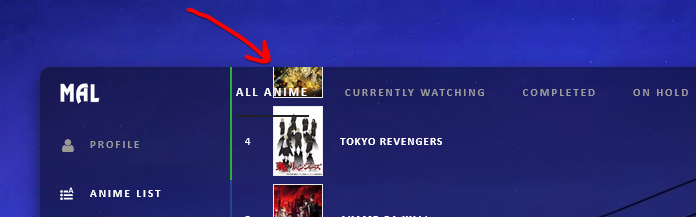 2. Is it possible to make anime covers larger when hovering over them? Similar to this:  I'm quite new to this so I don't have much experience in terms of customizing or general etiquette(whether I'm supposed to be posting here or not, etc.) Amazing work with all of these layouts, though! They are truly awesome. |
 |
Nov 2, 2021 1:10 PM
#94
HoloKirai said: Two quick questions - I'm sorry if I'm doing it wrong. 1. When the top overlay is transparent, is there a way to make it so the list itself doesn't overlap with the overlay? 2. Is it possible to make anime covers larger when hovering over them? Similar to this: I'm quite new to this so I don't have much experience in terms of customizing or general etiquette(whether I'm supposed to be posting here or not, etc.) Amazing work with all of these layouts, though! They are truly awesome. I don't see a transparent overlay on your layout. Add it and I will look at it Do you try the sticky with the list customizations to find the tutorial about big covers? There's one or maybe two topics on this. |
|
Dec 9, 2021 1:51 AM
#95

Hello! Um I am using the Dark Transparent version, and I noticed that when viewing the list from a separate account, the side bar or whatever its called looks a bit messy, is there any way I could possibly fix this? (its like this for both versions btw) Thanks in advance.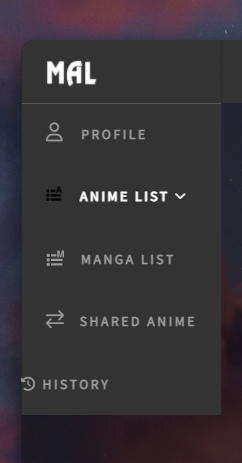 |
 |
Dec 21, 2021 10:23 AM
#96

How do I fix these dates? And by chance is it possible to change centerized background and move it a little? I want to move slightly downwards this amazing pictrue. Amazing layout, very smooth and straightforward. But font is a bit lacking I would say, is it possible to change it as well? Quick Edit: I added "days" in list settings and now it looks like this 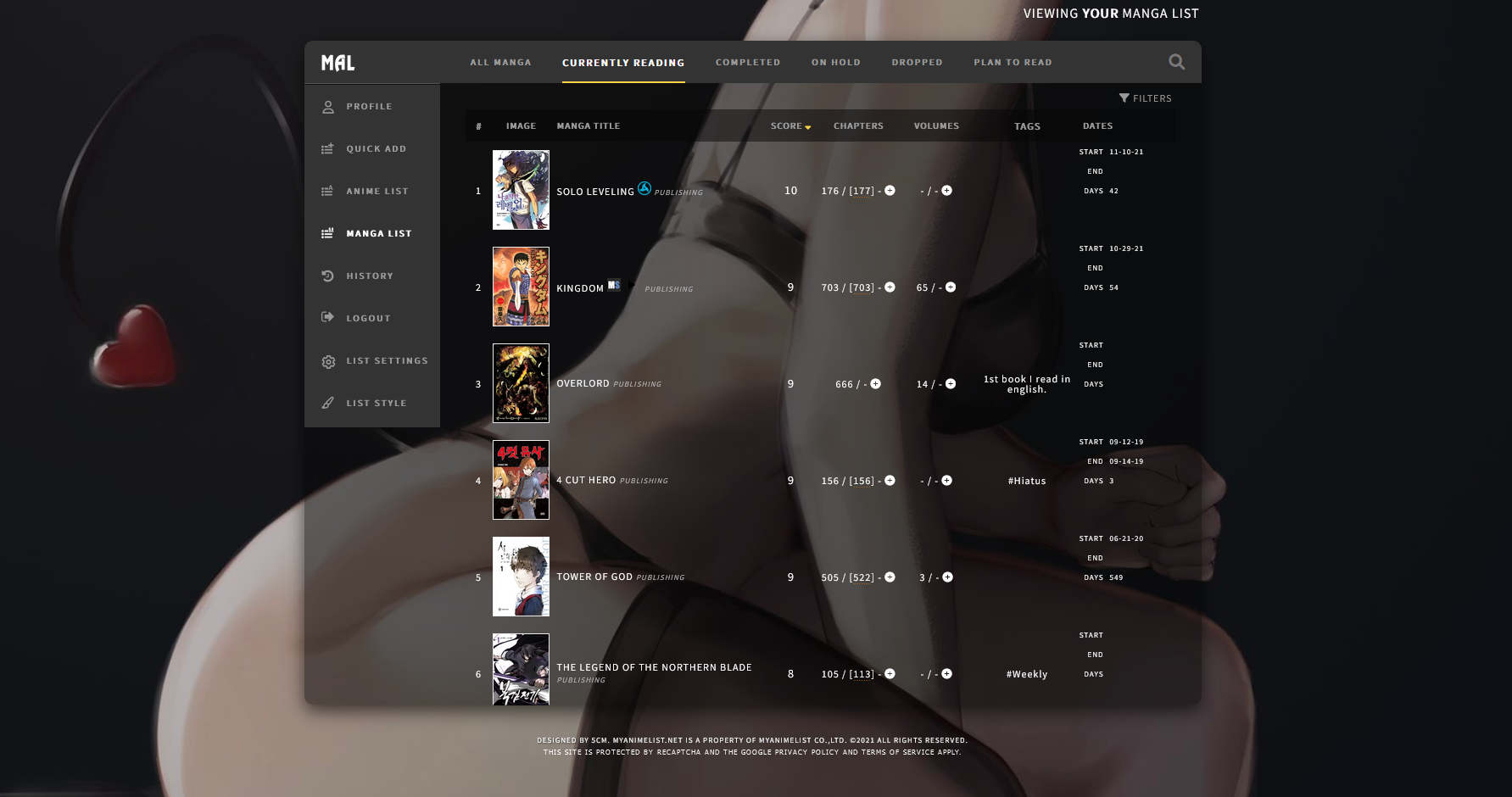 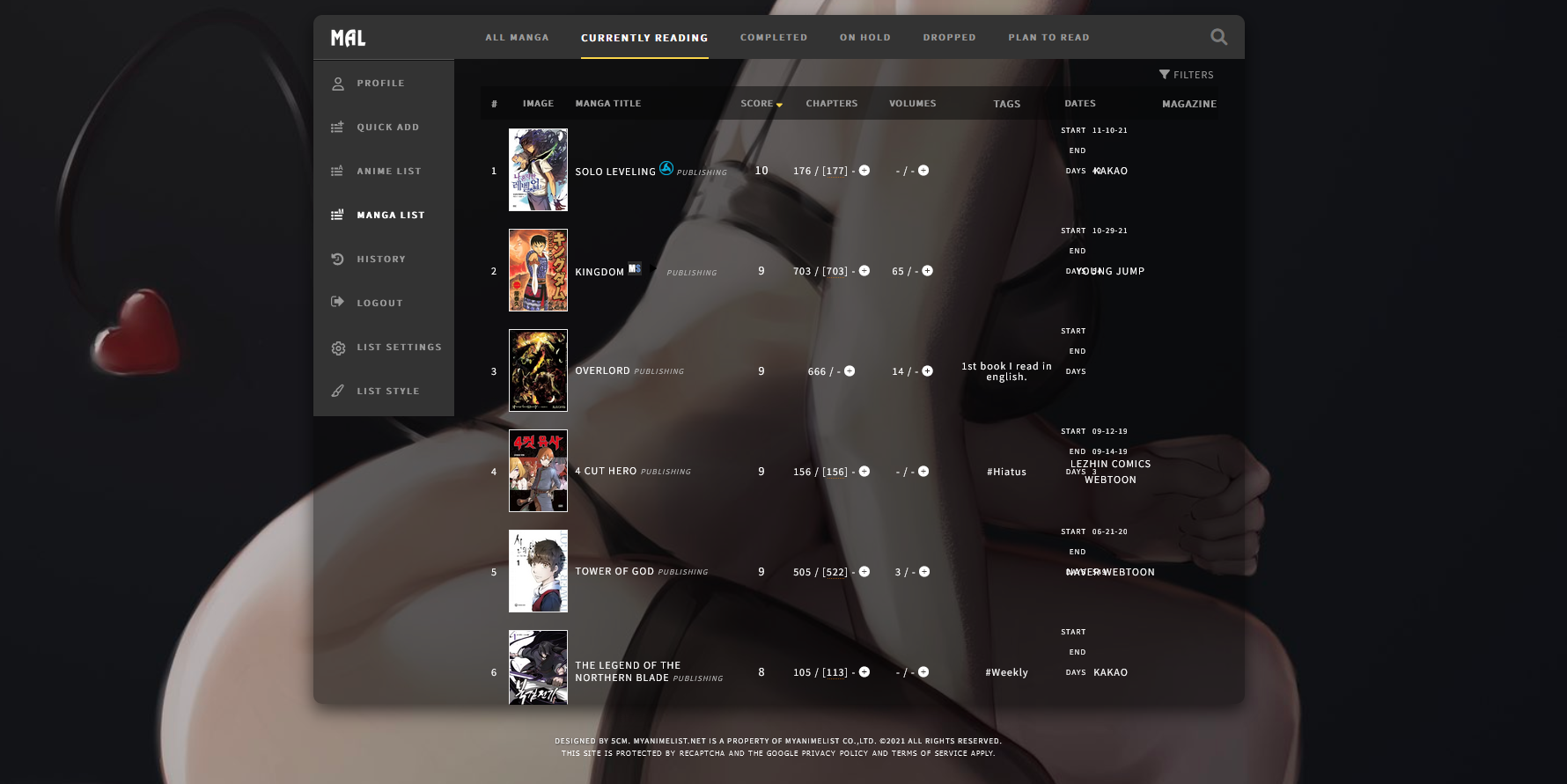 |
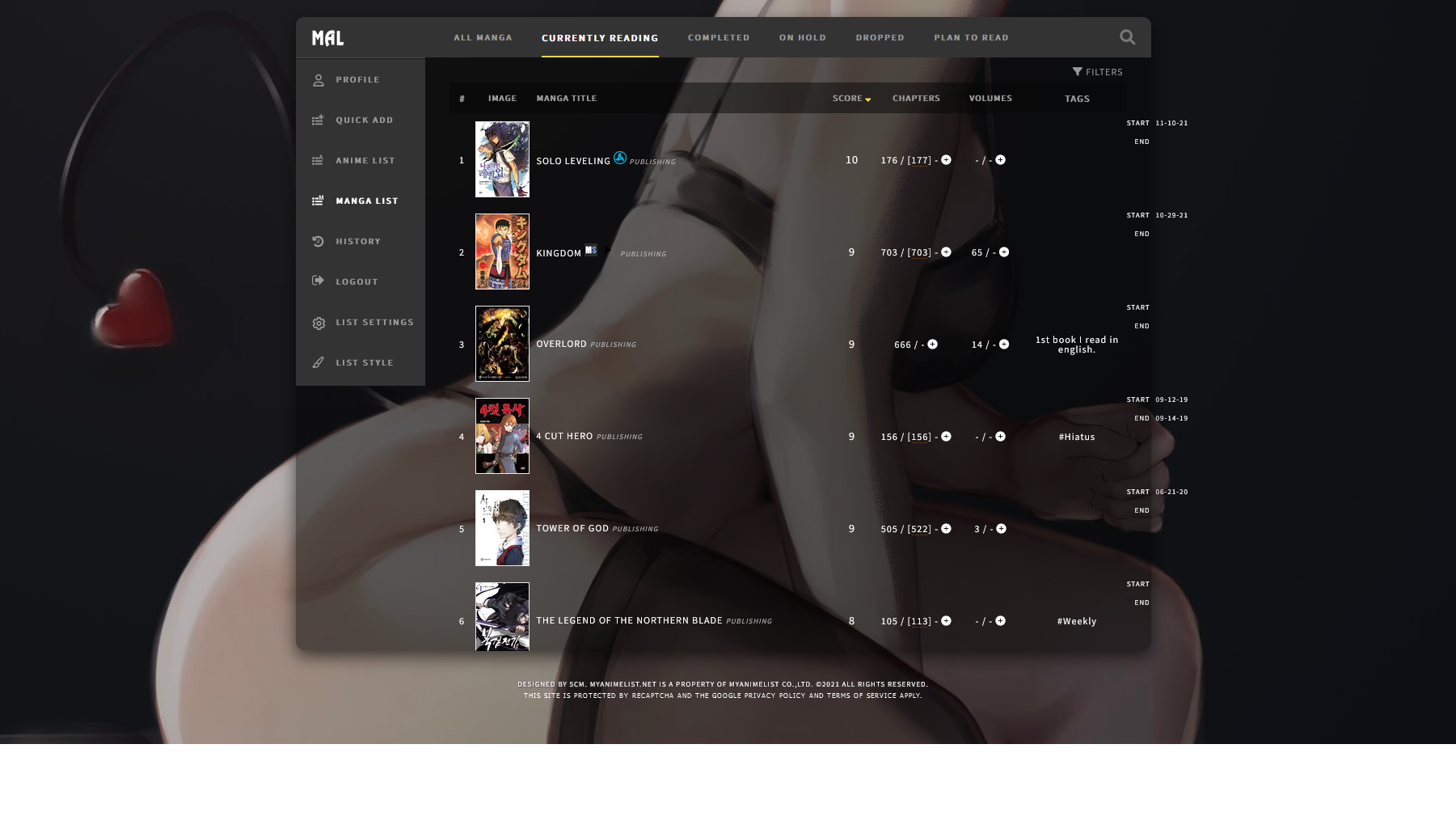

Raideroz-nimDec 21, 2021 11:20 AM
 |
Feb 1, 2022 6:11 PM
#97
| There were some scaling issues for the list and footer. The list overflowed depending on the number of entries and screen size. And the footer went across the list on and did not position properly on bigger screens. Here is my fix .list-container { margin-top: -2px; z-index: 70; padding-top: 51px; max-height: 75vh; overflow:auto; background: none; border: 0; } .list-container::-webkit-scrollbar{ /*visibility:hidden;*/ display:none; } body::before, body::after { height: 80vh; overflow: auto; } #footer-block {background: none; padding: 10px;} footer { top: 90%; height: 100px; } .list-container { margin-top: -2px; z-index: 70; padding-top: 51px; max-height: 75vh; overflow:auto; background: none; border: 0; } .list-container::-webkit-scrollbar{ /*visibility:hidden;*/ display:none; } body::before, body::after { height: 80vh; overflow: auto; } #footer-block {background: none; padding: 10px;} footer { top: 90%; height: 100px; } Scroll bar appears hidden for only the following browsers. |
removed-userFeb 1, 2022 6:36 PM
Feb 19, 2022 5:31 PM
#98

| Hey, thank you for this list I love it. However, me being the bot that I am came across some issues, so can I have some help with these problems? 1. There's a gap that appears whenever I scroll to the bottom, how do I make the last listed anime be as far as it goes down? 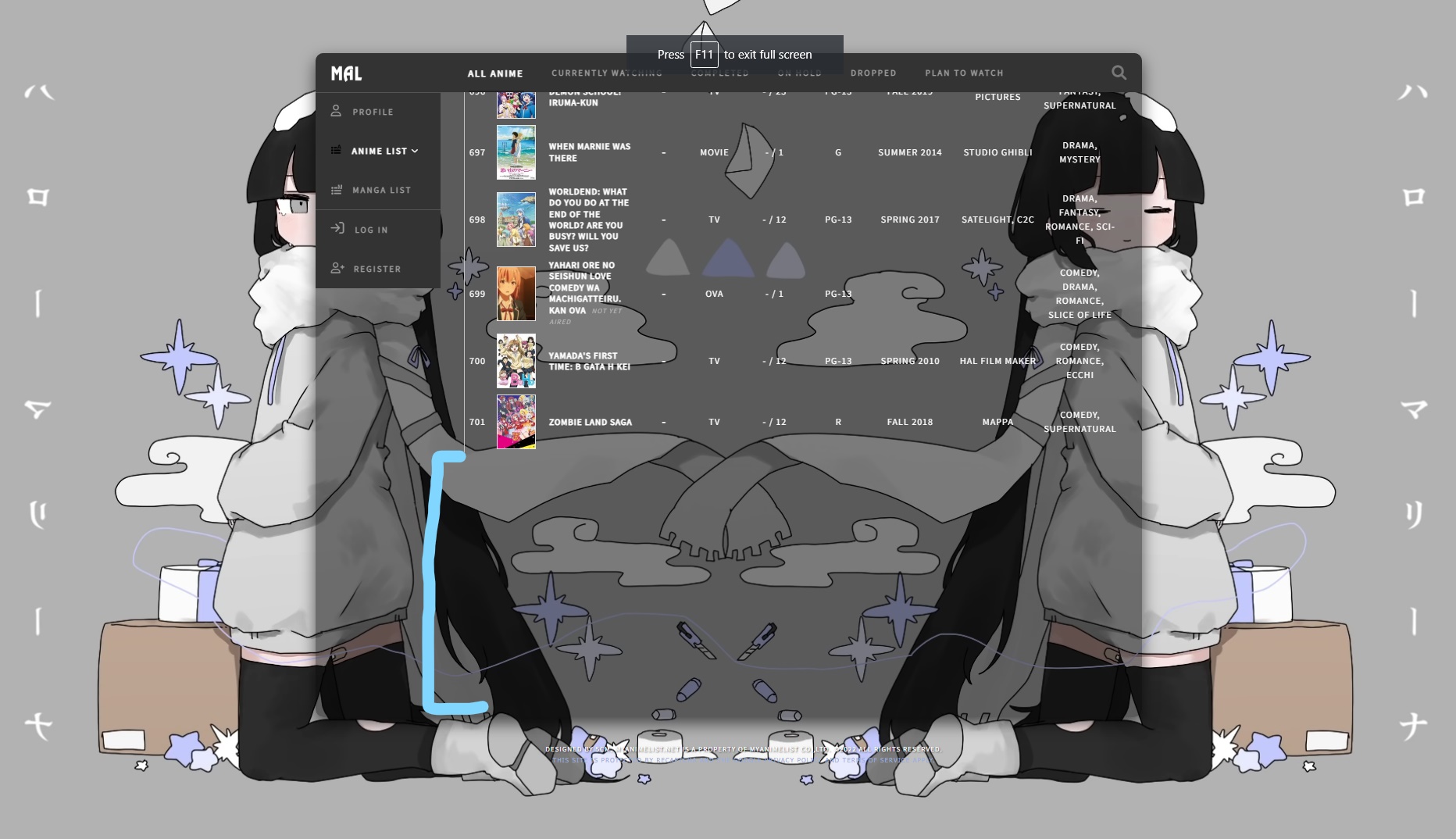 2. How do I adjust the anime name sizes? I saw the font resizer but it doesn't seem to do much for the anime titles. 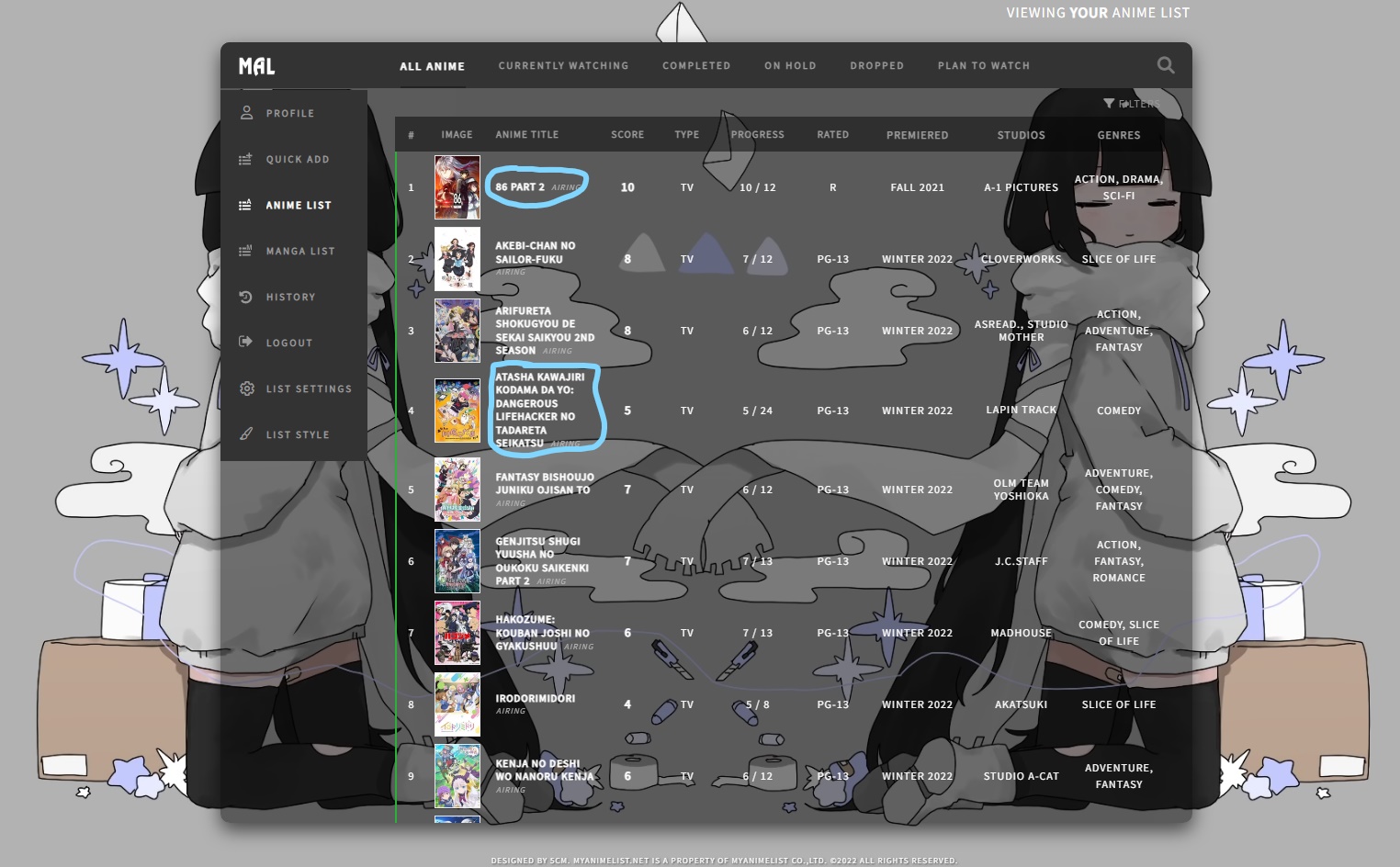 3. The A cuts out slightly (this may be an OCD thing with me) but how do I fix it so it fits properly? 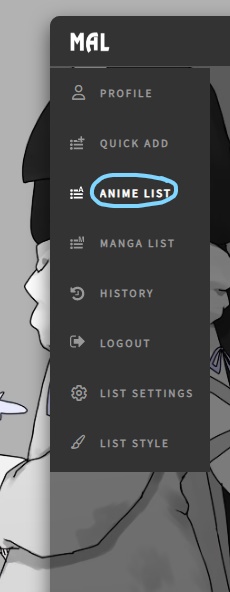 heres my current code if needed: /* "Dashboard" * List design by 5cm * Modified by Valerio Lyndon and Shishio-Kun */ @\import "https://fonts.googleapis.com/css?family=Source+Sans+Pro"; :root { --background: fixed center/cover url(https://i.imgur.com/pIujtui.png); } body { background: var(--background) !important; width: 1058px; font: 12px Source Sans Pro; letter-spacing: 1px; text-transform: uppercase; padding: 70px 0 0; margin: auto; color: white; } body::before, body::after { content: ""; position: fixed; top: 68px; left: calc(50% - 529px); width: 1058px; height: 541px; border-radius: 10px; pointer-events: none; } body::before { z-index: 60; background: rgba(5,5,5,.5); } body::after { z-index: 110; box-shadow: 0 8px 20px rgba(0,0,0,.6); } a {color: white;} #header-menu-button .fa, [data-owner=""] .list-menu-float, .cover-block, .list-menu-float .icon-menu.export, .list-menu-float .icon-menu.setting svg.icon-setting, .list-unit .list-status-title .text, #show-stats-button, .list-unit:not(.all_anime) .status, .icon-watch.ml4,[data-owner=""] .add-edit-more span, .more, .list-table .list-table-data .tags .edit, .list-unit:not(.watching) .icon-add-episode {display: none;} .header { position: fixed; top: 0; height: 68px; z-index: 100; background: var(--background); } .header .header-title {background: #333 15px 2px/50px no-repeat url(https://image.myanimelist.net/ui/fkLITaJTefafxFKPGRzngvQqHPDcc6jatqmY_RHEj9-Z8-4goIa5WgKMI8CQvYLg); width: 160px; height: 50px; top: 68px; z-index: 2; border-radius: 10px 0 0; border-bottom: 1px solid #555;} .header .header-title:hover {background-color: #222;} .header .header-menu.other {width: 160px; top: 118px; left: 0; z-index:2;} [data-owner=""] .header .header-menu .btn-menu, .header .header-menu .header-info {font-size: 0; text-align: left; margin: 0;} .header .header-menu .header-info {margin-top: 50px;} #header-menu-button, .anime .list-menu-float .icon-menu.anime-list, .anime .list-menu-float .icon-menu.anime-list svg, .anime .list-menu-float .icon-menu.anime-list .text, .anime .list-menu-float .icon-menu.anime-list:hover, .manga .list-menu-float .icon-menu.manga-list, .manga .list-menu-float .icon-menu.manga-list svg, .manga .list-menu-float .icon-menu.manga-list .text, .manga .list-menu-float .icon-menu.manga-list:hover { background-color: transparent; color: #333 !important; fill: #333;} #header-menu-button:before {content: ''; display: inline-block; width: 13px; height: 12px; margin: 0 10px 0 20px;} .anime #header-menu-button:before {background: left/cover url(https://image.myanimelist.net/ui/psYiTUtmhCM147Lw1c2IfEdpMGgqTXOAV7TUBQQzrxk9HddL_-Sx7EGuKbYvYuAf);} .manga #header-menu-button:before {background: left/cover url(https://image.myanimelist.net/ui/psYiTUtmhCM147Lw1c2IfEH4MpovaYtG8IwnuF48Imc3YkKXdBZRhkHFhaL-Jc1D);} .header a, .header .header-menu .list-menu .icon-menu {display: block; width: 160px; height: 50px; transition: none;} .header .header-menu .list-menu {top: 100px; left: 0; background: none; display: block!important; border: 0; box-shadow: none;} .header .header-menu .list-menu .icon-menu .text {left: 48px; top: 0; font-size: 11px; color: #999;} .header-info [href*=shared]:before {font: 14px FontAwesome; content: '\f0ec'; padding: 0 11px 0 20px;} .fa.fa-history {padding: 0 6px 0 21px; font-size: 16px;} .header-info [href*=login] {border-top: 1px solid #555;} .header-info [href*=login]:before {font: 17px FontAwesome; content: '\f090'; padding: 0 12px 0 20px;} .header-info [href*=register]:before {font: 14px FontAwesome; content: '\f234';padding: 0 12px 0 20px;} .header-info [href*=register]:after {content: 'Register'; font-size: 11px; letter-spacing: 2px;} .header a, .header a.username:after, .list-menu-float .icon-menu.profile:after { content: 'Profile'; font: bold 11px Source Sans Pro; color: #999!important; line-height: 50px; letter-spacing: 2px;} .header a:not(.header-title):hover, .header a:not(.header-title):hover::before, .header a:not(.header-title):hover::after, .header .header-menu .list-menu .icon-menu:hover, .list-menu-float .icon-menu.profile:hover { background: #222; color: white !important; text-decoration: none;} .header a.username, .header-info [href*=register], .list-menu-float .icon-menu.setting .text .link-style-setting { font-size: 0; letter-spacing: 0;} .header a.username:before {content: '\f007'; font: 15px FontAwesome; padding: 0 15px 0 20px;} .header a.username:hover:after, .header .header-menu .list-menu .icon-menu:hover svg.icon, .header .header-menu .list-menu .icon-menu:hover .text, .list-menu-float .icon-menu.setting .text .link-style-setting:hover:before { fill: white; color: white;} .header .header-menu .list-menu .icon-menu svg.icon, .list-menu-float .icon-menu svg.icon { width: 15px; fill: #999; top: 15px!important; left: 20px!important;} .list-menu-float { position: fixed; top: 120px; left: calc(50% - 529px); width: 160px; border: 0; z-index: 80; } .list-menu-float .icon-menu {background: #333; width: 100%; transition: none;} .list-menu-float .icon-menu.profile {background-image: none!important; width: 110px; padding-left: 50px; text-align: left;} .list-menu-float .icon-menu.profile:before {content: '\f007'; font: 15px FontAwesome; color: #999; position: absolute; top: 17px; left: 22px;} .list-menu-float .icon-menu .text {font: bold 11px Source Sans Pro; color: #999; letter-spacing: 2px; width: auto; top: 18px; opacity: 1; transition: none;} .list-menu-float .icon-menu.setting .text {left: 0; width: 100%; height: auto; text-align: left; opacity: 1;} .list-menu-float .icon-menu.setting .text .link-list-setting, .list-menu-float .icon-menu.setting .text .link-style-setting, .list-menu-float .icon-menu.setting:hover .text, .list-menu-float .icon-menu.setting:hover .text .link-list-setting, .list-menu-float .icon-menu.setting:hover .text .link-style-setting { background: #333; width: 100%; color: #999; line-height: 50px; border: 0; opacity: 1;} .list-menu-float .icon-menu:not(.profile):hover, .list-menu-float .icon-menu.setting .text .link-list-setting:hover, .list-menu-float .icon-menu.setting .text .link-style-setting:hover { background: #222; width: 100%; color: white;} .list-menu-float .icon-menu.profile:hover { background: #222; color: white; } .list-menu-float .icon-menu.profile:hover::before, .list-menu-float .icon-menu.profile:hover::after { color: white !important; } .list-menu-float .icon-menu.profile:hover:before, .list-menu-float .icon-menu.setting .text .link-list-setting:hover:before, .list-menu-float .icon-menu.profile:hover:after, .list-menu-float .icon-menu:hover .text {width: auto; color: white;} .list-menu-float .icon-menu.setting .text .link-list-setting {padding-left: 50px;} .list-menu-float .icon-menu.setting .text .link-style-setting:after { content:'List style'; font-size: 11px; letter-spacing: 2px; padding-left: 50px;} .list-menu-float .icon-menu.setting .text .link-list-setting:before { content: '\f013'; font: 16px FontAwesome; color: #999; position: absolute; margin:17px 0 0 -29px;} .list-menu-float .icon-menu.setting .text .link-style-setting:before { content: '\f1fc'; font: 14px FontAwesome; color: #999; position: absolute; margin: 17px 21px;} .list-container { margin-top: -2px; z-index: 70; padding-top: 51px; background: none; border: 0;} [data-owner=""] .list-container {margin-top: -2px;} .list-block, .status-menu-container.fixed + div.list-block {margin: 0; min-height: auto;} .list-unit { width: auto; margin-left: 160px; padding: 10px 30px calc(100vh - 609px); background: none; border-radius: 0 0 10px;} .status-menu-container, .status-menu-container.fixed { position: fixed; top: 68px; left: calc(50% - 369px); width: 898px; height: 50px; border-radius: 0 10px 0 0; } .status-menu-container .status-menu { height: 100%; margin-left: 0; border-spacing: 36px 0; } .status-menu-container .status-menu .status-button {font: bold 11px Source Sans Pro; letter-spacing: 2px;} .status-menu-container .status-menu .status-button.on {font-size: 12px; color: black;} .status-menu-container .status-menu .status-button:after {height: 2px;} .status-menu-container .status-menu .status-button.all_anime:after {background: #222;} .status-menu-container .status-menu .status-button.watching:after {background-color: #2db039;} .status-menu-container .status-menu .status-button.plantowatch:after {background-color: #c3c3c3;} .status-menu-container .status-menu .status-button.completed:after {background-color: #26448f;} .status-menu-container .status-menu .status-button.onhold:after {background-color: #f1c83e;} .status-menu-container .status-menu .status-button.dropped:after {background-color: #a12f31;} .status-menu-container .search-container #search-box input {font: 11px Source Sans Pro; color: #999; letter-spacing: 1px; padding: 0 8px; border-radius: 10px; border: 1px solid #ccc;} .list-unit .list-status-title {width: 100%; height: 20px; background:none;} .list-unit .list-status-title .stats {height: auto; line-height: 0;} .list-unit .list-status-title .stats a {color: #999; margin: 0;} .list-table .list-table-header .header-title, .list-table .list-table-header .header-title .link.sort, .list-table .list-table-header .header-title .link.sort:hover {color: grey;} .list-table .list-table-header .header-title.status, .list-table .list-table-data .data.status {width: 2px; padding: 0;background: ;} .list-table .list-table-data .data.title, .list-table .list-table-data .data.studio {height: 40px; line-height: 1.2em;} .list-table .list-table-data .data.title .link {font-size: 11px;} .list-table .list-table-data .data.title .add-edit-more {float: none; display: inline-block; height: 0; font-size: 0; white-space: nowrap; margin-left: 5px; opacity: 0;} .list-table .list-table-data .data.title:hover .add-edit-more {opacity: 1;} .list-table .list-table-data .data.title .content-status {font-size: 9px; font-style: italic;} .list-table .list-table-data a:not(.edit-disabled):hover {text-decoration: none; background: #444; color: white;} .add a, .edit a, .list-table .list-table-data .data.tags {font-size: 8px; line-height:1em;} .list-unit .loading-space {margin: 5px;} footer { position: fixed; top: 609px; left: 0; z-index: 100; width: 100%; height: calc(100% - 609px); background: var(--background); } #footer-block {background: none; padding: 20px;} #copyright {font: 9px Source Sans Pro; color: white; text-shadow: 1px 1px 2px #333; padding-top: 15px;} #copyright:before {content: 'Designed by 5cm.';} This at the bottom should fix the tags .data.tags span, .data.tags span a, .list-table .list-table-data .data.tags, .list-table .list-table-data .data.tags a{ text-transform: none !important; } #header-menu-button, .anime .list-menu-float .icon-menu.anime-list, .anime .list-menu-float .icon-menu.anime-list svg, .anime .list-menu-float .icon-menu.anime-list .text, .anime .list-menu-float .icon-menu.anime-list:hover, .manga .list-menu-float .icon-menu.manga-list, .manga .list-menu-float .icon-menu.manga-list svg, .manga .list-menu-float .icon-menu.manga-list .text, .manga .list-menu-float .icon-menu.manga-list:hover { background-color: transparent;} .status-menu-container { background-color: #333;} .status-menu-container { border-bottom: 0;} .list-table { border: 0; } .list-table > tbody:nth-of-type(2n+1) { background-color: transparent; } .list-table .list-table-data .data { border-bottom: 0; } .list-table .list-table-header .header-title { background: rgba(5,5,5,.5); } .list-table .list-table-header .header-title, .list-table .list-table-header .header-title .link.sort, .list-table .list-table-header .header-title .link.sort:hover { color: #9B9B9B; } .list-table .list-table-header .header-title .link { color: #9B9B9B; } .list-table .list-table-header .header-title:hover, .list-table .list-table-header .header-title .link.sort:hover, .list-table .list-table-header .header-title .link.sort:hover { color: white; } .list-table .list-table-header .header-title .link:hover { color: white; } .status-menu-container .status-menu .status-button.on { color: black; } .list-table .list-table-data a.edit-disabled { color: white; } .list-table .list-table-header .header-title { border-bottom: 0;} #header-menu-button, .anime .list-menu-float .icon-menu.anime-list, .anime .list-menu-float .icon-menu.anime-list svg, .anime .list-menu-float .icon-menu.anime-list .text, .anime .list-menu-float .icon-menu.anime-list:hover, .manga .list-menu-float .icon-menu.manga-list, .manga .list-menu-float .icon-menu.manga-list svg, .manga .list-menu-float .icon-menu.manga-list .text, .manga .list-menu-float .icon-menu.manga-list:hover { background-color: #333; color: white !important; fill: white; } .status-menu-container .status-menu .status-button.on { color: white; } .status-menu-container .status-menu .status-button:hover{ color: white; } .header a, .header .header-menu .list-menu .icon-menu{ background: #333; } body::before, body::after { height: 850px; } footer { top: 918px; height: 173px; } Thank you so much, once again! |
ScuzzyBearFeb 19, 2022 5:46 PM
 "𝘏𝘦𝘺, 𝘏𝘢𝘤𝘩𝘪... 𝘕𝘰 𝘮𝘢𝘵𝘵𝘦𝘳 𝘩𝘰𝘸 𝘮𝘶𝘤𝘩 𝘰𝘳 𝘩𝘰𝘸 𝘰𝘧𝘵𝘦𝘯 𝘱𝘦𝘰𝘱𝘭𝘦 𝘩𝘶𝘳𝘵 𝘦𝘢𝘤𝘩 𝘰𝘵𝘩𝘦𝘳, 𝘭𝘰𝘷𝘪𝘯𝘨 𝘴𝘰𝘮𝘦𝘰𝘯𝘦 𝘪𝘴 𝘯𝘦𝘷𝘦𝘳 𝘢 𝘸𝘢𝘴𝘵𝘦." ⁻𝘕𝘢𝘯𝘢 𝘖𝘴𝘢𝘬𝘪 |
Feb 21, 2022 11:24 AM
#99
ScuzzyBear said: Hey, thank you for this list I love it. However, me being the bot that I am came across some issues, so can I have some help with these problems? 1. There's a gap that appears whenever I scroll to the bottom, how do I make the last listed anime be as far as it goes down? 2. How do I adjust the anime name sizes? I saw the font resizer but it doesn't seem to do much for the anime titles. 3. The A cuts out slightly (this may be an OCD thing with me) but how do I fix it so it fits properly? heres my current code if needed: Thank you so much, once again! .list-unit {
padding: 50px 30px 100px !important;
}
.list-table .list-table-data .data.title .link {
font-size: 12px !important;
width: 300px;
}
#header-menu-button:before {
padding-left: 1px;
}The A doesn't cut off on my screen but you can try padding-left or margin-left |
| My Userscripts - Themes - Userstyles - Extensions (Chrome/Firefox) [API CSS] MAL-Scraper-API Cover/CSS Generator |
Feb 21, 2022 12:10 PM
#100
Thank you so much! This fixed all my issues. |
"𝘏𝘦𝘺, 𝘏𝘢𝘤𝘩𝘪... 𝘕𝘰 𝘮𝘢𝘵𝘵𝘦𝘳 𝘩𝘰𝘸 𝘮𝘶𝘤𝘩 𝘰𝘳 𝘩𝘰𝘸 𝘰𝘧𝘵𝘦𝘯 𝘱𝘦𝘰𝘱𝘭𝘦 𝘩𝘶𝘳𝘵 𝘦𝘢𝘤𝘩 𝘰𝘵𝘩𝘦𝘳, 𝘭𝘰𝘷𝘪𝘯𝘨 𝘴𝘰𝘮𝘦𝘰𝘯𝘦 𝘪𝘴 𝘯𝘦𝘷𝘦𝘳 𝘢 𝘸𝘢𝘴𝘵𝘦." ⁻𝘕𝘢𝘯𝘢 𝘖𝘴𝘢𝘬𝘪 |
More topics from this board
» ⭐Ready to be amazed? View the Bunkasai graphic and list design contest (VOTE YOUR FAVES!)Shishio-kun - Nov 22 |
3 |
by Shishio-kun
»»
Nov 28, 9:02 PM |
|
Sticky: » [ BBCODE ] All 2023 BBcodes, Guides, and Templates ( 1 2 )Shishio-kun - Feb 16, 2023 |
65 |
by F124N
»»
Nov 11, 1:31 AM |
|
» ✳️[9-7-24] New even higher quality Cover Imports! + Fixes for Takana Grids and moreShishio-kun - Sep 7, 2024 |
37 |
by Shishio-kun
»»
Oct 30, 4:42 AM |
|
» [CSS - MODERN] ⚡️ Fully-Customizable Layouts (2024 updates!) ( 1 2 3 4 5 ... Last Page )Shishio-kun - Jul 21, 2017 |
388 |
by Shishio-kun
»»
Oct 14, 1:27 PM |
|
» ❓ Ask for help here + See Frequently Asked Questions ( 1 2 3 4 5 ... Last Page )Shishio-kun - Apr 15, 2010 |
7925 |
by Kiara
»»
Oct 13, 10:21 AM |